It's been a while between posts. I have been teaching an intensive.
The big news since the last time I have posted is of course the new GMail. There is a bunch of great articles about the features on other sites. There are three things I would like to focus on insofar as the new features are concerned from a productivity point of view.
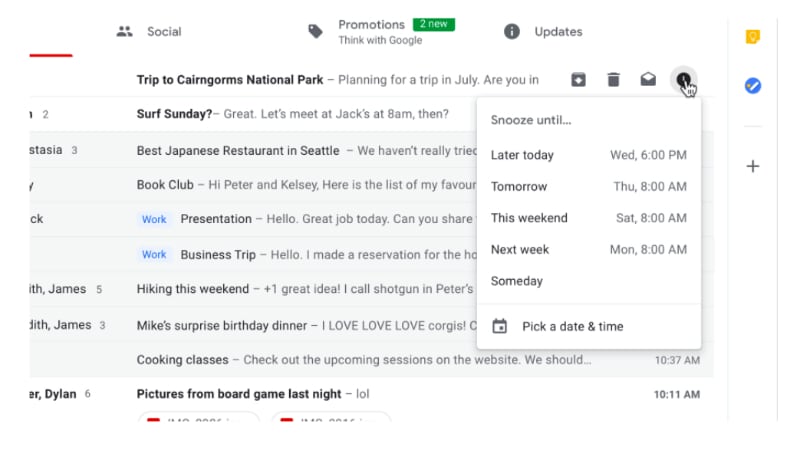
The first is the snooze function.
Snooze IS AMAZING! You can quickly move through your email inbox and snooze messages that you don't want or have to deal with. This has the effect of being able to use your GMail inbox as a task list. This functionality has been available in Google's Inbox for a long time now, but the difference between this recent GMail change and Inbox is that instead of having to change the way in which you manage your workflow based on how the designers of Inbox think you need to work, you can take this one feature of Inbox and implement it in your GMail based workflow.
The second thing I want to mention is the closer integration between Google Tasks and GMail. Previously you have been able to convert your emails into Calendar appointments but now, you can convert emails into tasks and Google have released a new Tasks app.
Seriously, this app has been a long time coming. It is simple, clean and has a small memory footprint. It is a great front end to the Google Tasks that has existed since they first implemented tasks. Being the productivity geek that I am, I was onto it right away. However, in spite of how this could totally simplify my life, the current implementation lacks tags and/or filters. My workflow heavily influenced by GTD requires that my to do system gives me the ability to see all my tasks but then whittle my list down according to (multiple) contexts. So I have installed the app on my Pixel 2 and Pixelbook and will keep an eye on it each update seeing if the powers that be add this feature some time in the future.
The third thing I want to note is Offline Gmail. Most people are unaware that if you use Chrome, there is actually the ability for you to use Gmail Offline. It has been around for years now however the interface is very 2000's. Buried in the copious detail regarding the new GMail was reference to the fact that in a few weeks after the launch, all of the new goodies will be available in an offline version. Now that is something I am pretty excited about. I will keep you posted on that front.
Trying to get stuff done on my Pixel 2 and Chrome OS Pixelbook! Productivity tips, GTD apps and other stuff!
Showing posts with label Android. Show all posts
Wednesday, May 2, 2018
Monday, April 2, 2018
So much for a week...
In my last post I mentioned that I would be offline for about a week as I recovered from a routine operation. Well that took far more weeks that I thought. Closer to six. I am only just getting back to 100%.
Seeing as I have not been doing allot of work, the thing I have been utilising the most is an app for managing my D&D campaign (that's Dungeons and Dragons for all you non gamer types. And when I say gaming, I mean old school pen and paper D&D.
D&D experienced a downturn in sales when they launched their ill fated D&D 4. Wizards of the Coast, the current owners of the D&D franchise thought they would smash together the successful 3 (and 3.5 update) with Magic The Gathering, the other successful franchise that they own. The result was a terrible hybrid and fans of the game, many who had played the game for decades, abandoned the game in their thousands.
In 2012, WotC released version 5, the unofficially names "We're Sorry" edition. Since then it has experienced quite the resurgence. What has been lacking since 2012 is a slew of digital tools for GM's (Game Masters, the individual in a gaming group that organises all the other players acting as story teller, game administrator etc). Many other companies have tried creating all sorts of cool apps, especially the kind that help the harried GM keep track of all the data necessary to run a long term campaign. Those apps and sites have constantly been harried by WotC's strange approach to licensing.
I have used many apps, particularly Android ones (and I am happy to review them if you are interested) however after 5 years of waiting, Dungeons and Dragons Beyond is recently out of beta and available to GM's and players alike.
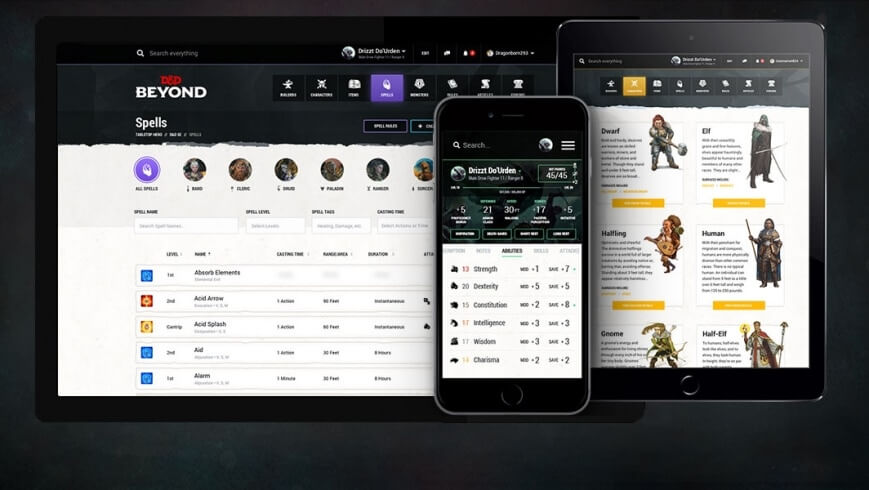
D&D Beyond is an website, an app, an archive, an online editor with new features slowly but surely being added. I primarily use the web site. Here I have purchased digital versions of the three core books needed to play the game irl. I actually already own the physical versions of the books, however having digital versions available on the website and the app make referencing much faster, therefore speeding up game play.
On the web site, as well as having digital references I have "live" character sheets. These are digital simulacrums of the paper versions, however instead of having to find the page number for the game mechanic of something or other referenced on the paper character sheet, I can just click on the feature on the digital character sheet and in most cases gaming mechanics appear in a drop box without having to leave the sheet. Occasionally the link is to a reference page, however the speed with which you are able to reference immense amounts of data just reinforces how happy my decision to pay some extra money to have digital versions of all of my reference material.
I am still awaiting more features. For you rpg gamer types, I am waiting for things like initiative and HP trackers mainly, however the lure of more powerful world building tools is tempting me to take our a subscription, which for long time readers of my blog, is a big deal (ie: I hate the subscription model).
I primarily use my Pixelbook for research, game writing, and the actual game and then the free Android app when a gaming thought strikes me whilst I am doing something else. Whilst the app is free, you need to unlock the content, however when you unlock the content, it is available across the web site and two mobile devices.
So that is what I have been doing whilst on sick leave.
I hope you don't mind my extending this productivity into my rpg gaming hobby.
Seeing as I have not been doing allot of work, the thing I have been utilising the most is an app for managing my D&D campaign (that's Dungeons and Dragons for all you non gamer types. And when I say gaming, I mean old school pen and paper D&D.
D&D experienced a downturn in sales when they launched their ill fated D&D 4. Wizards of the Coast, the current owners of the D&D franchise thought they would smash together the successful 3 (and 3.5 update) with Magic The Gathering, the other successful franchise that they own. The result was a terrible hybrid and fans of the game, many who had played the game for decades, abandoned the game in their thousands.
In 2012, WotC released version 5, the unofficially names "We're Sorry" edition. Since then it has experienced quite the resurgence. What has been lacking since 2012 is a slew of digital tools for GM's (Game Masters, the individual in a gaming group that organises all the other players acting as story teller, game administrator etc). Many other companies have tried creating all sorts of cool apps, especially the kind that help the harried GM keep track of all the data necessary to run a long term campaign. Those apps and sites have constantly been harried by WotC's strange approach to licensing.
I have used many apps, particularly Android ones (and I am happy to review them if you are interested) however after 5 years of waiting, Dungeons and Dragons Beyond is recently out of beta and available to GM's and players alike.
D&D Beyond is an website, an app, an archive, an online editor with new features slowly but surely being added. I primarily use the web site. Here I have purchased digital versions of the three core books needed to play the game irl. I actually already own the physical versions of the books, however having digital versions available on the website and the app make referencing much faster, therefore speeding up game play.
On the web site, as well as having digital references I have "live" character sheets. These are digital simulacrums of the paper versions, however instead of having to find the page number for the game mechanic of something or other referenced on the paper character sheet, I can just click on the feature on the digital character sheet and in most cases gaming mechanics appear in a drop box without having to leave the sheet. Occasionally the link is to a reference page, however the speed with which you are able to reference immense amounts of data just reinforces how happy my decision to pay some extra money to have digital versions of all of my reference material.
I am still awaiting more features. For you rpg gamer types, I am waiting for things like initiative and HP trackers mainly, however the lure of more powerful world building tools is tempting me to take our a subscription, which for long time readers of my blog, is a big deal (ie: I hate the subscription model).
I primarily use my Pixelbook for research, game writing, and the actual game and then the free Android app when a gaming thought strikes me whilst I am doing something else. Whilst the app is free, you need to unlock the content, however when you unlock the content, it is available across the web site and two mobile devices.
So that is what I have been doing whilst on sick leave.
I hope you don't mind my extending this productivity into my rpg gaming hobby.
Wednesday, February 14, 2018
I just may cancel my Audible subscription.
Long time Kindle customer. So much so I went and bought a Kindle Paperwhite edition last year (with the gift voucher from the inlaws). It was a natural extension to become a regular Audible customer with Whispersync between the Kindle and Audible. Besides, the golden bullet for our family in terms of how to keep the kids from beating each other up on long car trips has been audio books (thank you Rick Riordan!).
I have been recommending Altered Carbon to any sci fi fan who would sit still long enough to listen to me rave about how it is the second best sci fi book ever after Neuromancer by William Gibson. Ok maybe third after Thirteen/Black Man by Richard Morgan. When I heard that Altered Carbon was to be given the Netflix treatment I thought I should read the book again. I flicked through the Kindle store and inbetween pulling the trigger on purchasing the Kindle edition and deciding whether I wanted the Kindle or Audible version, I received an email from our public library informing us that Libby was now available to users.
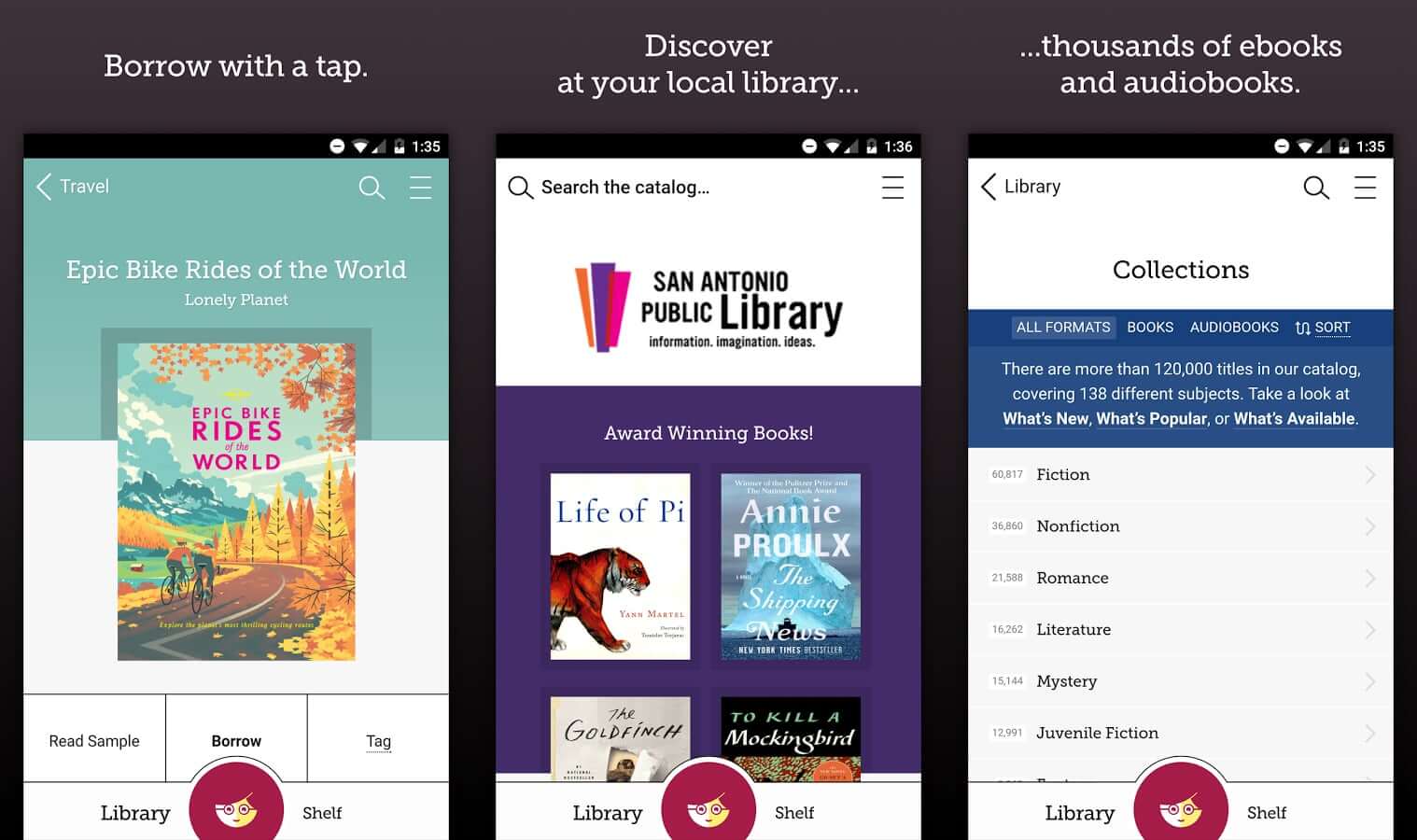
Libby is brilliant. It is like the Kindle and Audible apps combined. You simply log in with your library card number and pin number (make sure you have that set up with your library before you do try and log in) and you are away. Search for books, loan them, make loans and viola, your Kindle/Audible bill will be slashed considerably. And like me, you may find yourself seriously considering cancelling your Audible subscription!
I have been recommending Altered Carbon to any sci fi fan who would sit still long enough to listen to me rave about how it is the second best sci fi book ever after Neuromancer by William Gibson. Ok maybe third after Thirteen/Black Man by Richard Morgan. When I heard that Altered Carbon was to be given the Netflix treatment I thought I should read the book again. I flicked through the Kindle store and inbetween pulling the trigger on purchasing the Kindle edition and deciding whether I wanted the Kindle or Audible version, I received an email from our public library informing us that Libby was now available to users.
Libby is brilliant. It is like the Kindle and Audible apps combined. You simply log in with your library card number and pin number (make sure you have that set up with your library before you do try and log in) and you are away. Search for books, loan them, make loans and viola, your Kindle/Audible bill will be slashed considerably. And like me, you may find yourself seriously considering cancelling your Audible subscription!
Monday, January 22, 2018
The most used Pixelbook app this week is...
Gmail. The Pixelbook (obviously) comes with Chrome OS. By default, you get Offline Gmail (check out this and this if you didn't know you could use Gmail offline in your Chrome browser and you want to learn how) in Chrome OS and the Pixelbook comes with a shortcut link.
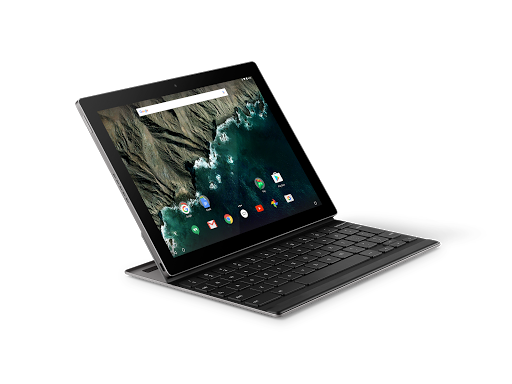
However, as cute as offline Gmail in Chrome is, I am just used to using the Gmail Android app on the Pixel C.
So this week, whilst I am technically back at work, not everyone else that I need to interact with as part of my current working arrangements are, so I am emailing away like a champion and using the Android app to do it. Maybe I will revisit Offline Gmail, but for now, the winner is Gmail for Android.
However, as cute as offline Gmail in Chrome is, I am just used to using the Gmail Android app on the Pixel C.
So this week, whilst I am technically back at work, not everyone else that I need to interact with as part of my current working arrangements are, so I am emailing away like a champion and using the Android app to do it. Maybe I will revisit Offline Gmail, but for now, the winner is Gmail for Android.
Friday, October 27, 2017
Oero 8.0 = Pixel C Hell
Ever since I downloaded Oreo for the Pixel C, it has been hell on a jetski.
I have had no problems on my Pixel C. Ever.
I download Oreo and I get the dreaded dark screen (your Pixel C turns on but the screen is so dark you cannot read any of the screen prompts), reboots, split screen fritz and random reboots.
If I was cynical I would suggest that Google put code in Oreo to make Pixel C users so frustrated that they purchase the Pixelbook out of frustration.
Seriously very poor form from Google.
I have two options as far as I can see it.
I have had no problems on my Pixel C. Ever.
I download Oreo and I get the dreaded dark screen (your Pixel C turns on but the screen is so dark you cannot read any of the screen prompts), reboots, split screen fritz and random reboots.
If I was cynical I would suggest that Google put code in Oreo to make Pixel C users so frustrated that they purchase the Pixelbook out of frustration.
Seriously very poor form from Google.
I have two options as far as I can see it.
- Purchase the new Pixelbook which I was going to anyway.
- Enrol the Pixel C in the Android Beta program (https://www.google.com/android/beta)
The problem with most of the reviews of the Pixelbook is that reviewers are largely comparing it to other Ultrabooks. Few reviewers are comparing it to other Android tablets.
I read one article that suggested that the reality is the Pixelbook is the new Google Android tablet and that is the future. I am a little bumbed that you can't detatch the keyboard but there would be no point to that as it is primarily a Chomebook.
Regardless, I am going to enrol my trust Pixel C in the beta program and see if that does not fix the fritzing problem because I would rather choose to upgrade my hardware according to my own timeline rather than Googles.
Thursday, September 21, 2017
The future of Google devices
I have started researching the replacement for my Google Pixel C. Don't get me wrong, there is nothing wrong with it at the moment. If anything, after the Oreo update it actually seems to be a little zippier. I am writing this blog post (and doing a ton of other stuff on it today from my local cafe) and all in all, I still think it is the best bit of harward that Google have ever produced.
However, it is only a matter of time before it will not be able to keep up with my needs. So, thinking that I will need to research a replacement in about a years time, I have started looking around.
I swore years ago that I would never get a Samsung device again. The decision was made on the basis of Samsung's way of loading their devices with bloatware and the way in which they bastardise Android. However in terms of the 9 to 10 inch tablet form factor, I do not see that there are many other options.
Two of the possible alternatives are the Remarkable and the recently (as of yesterday) leaked Google Pixelbook.
As a knowledge worker in the area of tertiary education and coaching and professional development, I have found the case for the Remarkable pretty compelling. I mainly read, write and the idea of a device that will not break the concentration (ie: no Twitter, Facebook, Whatsapp interuptions hardcoded into the device) is as I said quite compelling. Check out their Youthube video propaganda and see what you think.
Going the way of the Remarkable would still leave me at a loss insofar as the other tablet related things that I need to do, namely the aforementioned social media messaging, posting and communication. I am unsure as to how the Remarkable interacts with things like Google Drive (which I have a significant investment in) so there would need to do some serious research prior to committing to what from a distance appears to be a really compelling and cool piece of tech.
I have also alluded to the fact that there was a "leak" yesterday in relation to a slew of new Google devices about to be announced in a few weeks time. I was really really hoping that Google would suprise me with an announcement about a replacement for the 2015 Google Pixel C.
I was initially saddened but over the last 24 hours have become not a little bit curious about what the leakers are referring to as the Google Pixelbook.
It appears that the Pixelbook is a Google designed and manufactured Chromebook. (Check out this article on The Verge about yesterdays leak.) This one appears to come with a stylus too, which for me personally has become increasingly important as I have always been the kind of person to carry several paper notebooks and then scanning the contents to Google Drive.
I have never used a Chromebook and have been tempted several times. The ones that seem durable enough for my knockabout lifestyle however start to cost the same as an entry level laptop which has been my most significant point of resistance.
I am cautiously curious about this one however. It seems to be a foldback type laptop so that you can use the device as a tablet. The other points of caution for me are using ChromeOS over Android, the inability to separate the keyboard from the tablet (like the Pixel C) and of course the price.
I will continue to watch with curiosity and see what happens on October the 4th which I believe is the date that Google will be making their annoucements.
Watch this space.
Oh, and of course, if anyone does know of a successor to the Pixel C, drop me a line.
Tuesday, May 30, 2017
Slimsocial, Facebook lite.
It's been a while. Sorry about that. The real job has been a little demanding lately.
Speaking of the real job, I need to use Facebook for work. I am not a big fan of Facebook and often wonder what my life would be like without it? More on that front later.
I have mentioned before that Facebook apps are not the best of Android friends, namely for power conservation reasons. I find that both the Facebook app and Messanger tend to be real battery hogs. So what to do?
A brief search resulted in my discovering Slim Social.
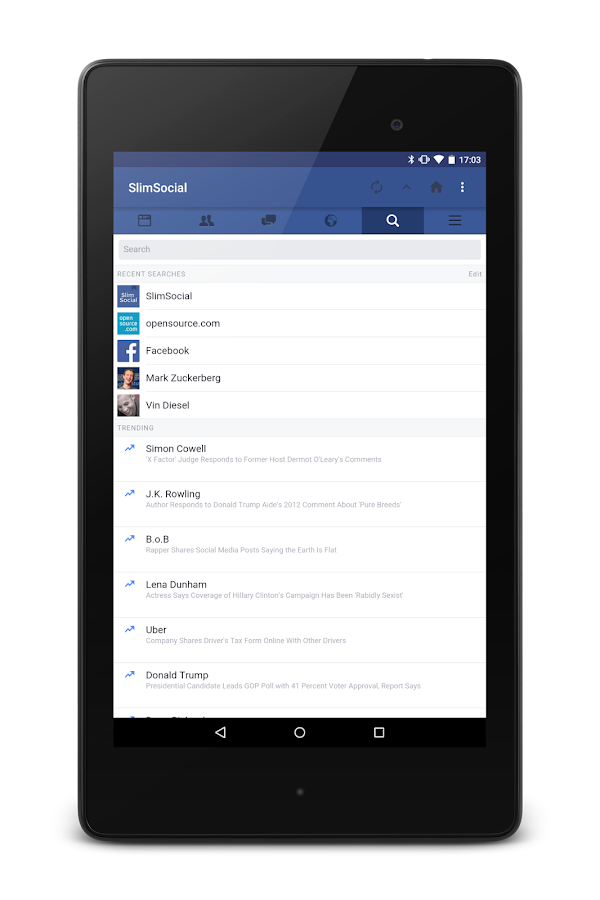
It is a simple Facebook wrapper. It is quick, lite and you can access Facebook messages from within the app without having to install Facebook Messanger (although this is not what I do, more on that in another post).
Occasionally it breaks (when Facebook changes something to try and force you back to their apps) however the developer tends to get that sorted in a day or three and you are back in business.
Been using it for close to a year now and find it does all I need and is kind to my battery.
Have at it you good things.
Speaking of the real job, I need to use Facebook for work. I am not a big fan of Facebook and often wonder what my life would be like without it? More on that front later.
I have mentioned before that Facebook apps are not the best of Android friends, namely for power conservation reasons. I find that both the Facebook app and Messanger tend to be real battery hogs. So what to do?
A brief search resulted in my discovering Slim Social.
It is a simple Facebook wrapper. It is quick, lite and you can access Facebook messages from within the app without having to install Facebook Messanger (although this is not what I do, more on that in another post).
Occasionally it breaks (when Facebook changes something to try and force you back to their apps) however the developer tends to get that sorted in a day or three and you are back in business.
Been using it for close to a year now and find it does all I need and is kind to my battery.
Have at it you good things.
Monday, November 7, 2016
Android Pay live at Bendigo Bank!
I mentioned that I would notify you the moment Android Pay bevame live at Bendigo Bank in Australia as soon as it was available. How remiss of me as it has been available for about 6 weeks now. *Blush*
Um, er, so here it is! I have added all of my Bendigo Bank cards, my work based card from a smaller credit union bank, and a slew of loyalty program cards. This loyalty card program feature is quite nice (or intrusive depending on your perspective) in that the app will notify me when I am in range of an establishment that I have a registered loyalty program card for. Handy feature, especially if one of them is for building and harware store (Mitre 10, I'm looking at you!).
So, whilst I have been leaving my wallet at home and Android Paying my way through my life (Banks, Apple fight to entrench their dominance in their customers lives) I'll just leave this here then.
Um, er, so here it is! I have added all of my Bendigo Bank cards, my work based card from a smaller credit union bank, and a slew of loyalty program cards. This loyalty card program feature is quite nice (or intrusive depending on your perspective) in that the app will notify me when I am in range of an establishment that I have a registered loyalty program card for. Handy feature, especially if one of them is for building and harware store (Mitre 10, I'm looking at you!).
So, whilst I have been leaving my wallet at home and Android Paying my way through my life (Banks, Apple fight to entrench their dominance in their customers lives) I'll just leave this here then.
Monday, October 24, 2016
Facebook Messenger eating your Android battery?
I use Facebook mainly for work. Not a huge fan of the social media platform, being an avid Twitter user myself. One of the things I dislike about Facebook on Android (apart from the crass way it dominates many aspects of your device) is the terrible wear on your battery. I find battery longevity is around 20% greater when I have Facebook Messenger installed on my Nexus 5X or Pixel. What to do?
I use Slim Social as the primary way in which I interact with Facebook on my Android devices (more on that next week) however for messaging, I discovered Disa. It is a reasonably simple app that surprise surprise, does messaging! You can use it for texting, WhatsApp and Facebook however I simply use it for Facebook at this stage.
It has a slightly clunky feel to it, however in terms of functionality, it does everything that Facebook Messenger does sans the drain on your battery. You do get the option to have it poll regularly but this comes with a battery drain warning which I appreciate.
It does the trick, doesn't impact upon my battery as much as regular Messenger and sits quietly in the background. Simple. Done.
Tuesday, October 18, 2016
Tiny Scanner, a simple gem.
Simplicity itself. All I needed was an app that would a) allow me to take a photo of a document or use a preexisting image and b) create a pdf of the image and then c) allow me to append new photo's/images to the document. Icing on the cake would be the ability to alter the order of the pages in the pdf.
App after app all failing in one of the three aforementioned categories and then BOOM, Tiny Scanner.
The app has a small memory footprint, is (as far as I can tell) add/bug free and simplicity itself to use. If you need a way to quickly make your own pdf's out of your own images, with an append and/or page rearrange function, this is your baby.
I may even pay for it!
App after app all failing in one of the three aforementioned categories and then BOOM, Tiny Scanner.
The app has a small memory footprint, is (as far as I can tell) add/bug free and simplicity itself to use. If you need a way to quickly make your own pdf's out of your own images, with an append and/or page rearrange function, this is your baby.
I may even pay for it!
Tuesday, August 30, 2016
Pixel C Spilt Screen has arrived!
Guess what you are looking at? That's right! It is my SPLIT SCREEN Pixel C. I was on the train this morning and I was notified that my Pixel C's official Android 7.0 update was available. I accidentally hit ok and the download chewed through the last of my mobile data allowance for the month (roll on September 4!) and within 10 minutes, the Pixel had downloaded and installed the update, rebooted and then ran through the app udate process. I worked for the last 10 minutes of my morning train commute with Android 7.
I may be too much of a fanboy or 7.0 is smoother than 6.1. It seemed to transition between things more smoothly and the OS animations also seem smoother and snapier.
In the last 30 minutes, I have only played around with split screen, notifications (great improvement there) and editing the pull down settings bar (finally!). All in all, 7.0 had been a positive experience on my primary device. I'll keep you posted.
Tuesday, August 9, 2016
Handy Google Maps Article
Thursday, July 28, 2016
Android Pay is here!
Android Pay has hit Australia's shores. You need to head into the Google Play store and "Enable" it (as oppossed to the usual "Install" button. My personal frustration is that it works with my buniness related bank, but not the bank I use personally, which is the Bendigo Bank.
A frustrating conversation with the Bendigo Bank helpdesk resulted in my finding out that it is "coming" but they could not give me any kind of source I could keep my eye on when it went live.
As soon as that happens, goodbye wallet!
Sunday, April 10, 2016
BubbleUPnP, my multimedia glue app.
These days I have all of my media needs sorted by two apps. Netflix and Google Play Movies & TV. However, occasionally there is a media need that falls between those two cracks.
I have a bunch of media that sits on a Synology drive at home and to access that media, I use BubbleUPnP. I have used this app since its very beginnings. It wasn't pretty early on, however over the years, it has matured to be an incredibly stable and "automagic" app that picks up the available drives on your network, and seamlessly presents them to you with the simplicity and efficiency of a Netflix and/or Google Movies & TV app.
Just want to make sure that you are aware that you need a media player in addition to the app, as its role is to locate and serve media, which it does brilliantly.
I have a bunch of media that sits on a Synology drive at home and to access that media, I use BubbleUPnP. I have used this app since its very beginnings. It wasn't pretty early on, however over the years, it has matured to be an incredibly stable and "automagic" app that picks up the available drives on your network, and seamlessly presents them to you with the simplicity and efficiency of a Netflix and/or Google Movies & TV app.
Just want to make sure that you are aware that you need a media player in addition to the app, as its role is to locate and serve media, which it does brilliantly.
Tuesday, February 9, 2016
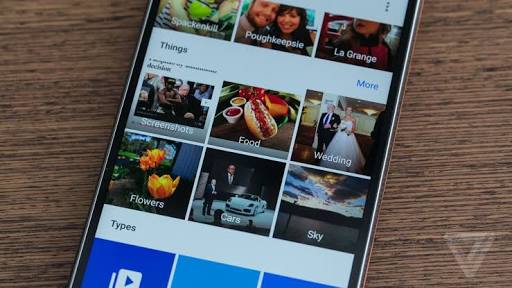
Google Photo's is amazing!
I am not sure when it happened, but suddenly Google Photo's became amazing. If you are not aware, you can choose between two modes of file storage. You can choose to store your photo's at the same quality that you took them, OR if you choose the standard photo storage size, you get unlimited (yep you read that right) storage of your photo's in Google Drive. Forever. That's it. No catch. That is the hook that first got me started.
However, the app on Android and then the web site just seemed to make a rapid number of incremental changes until it is now one of the apps that I use frequently, and it is a joy.
I think that unless you are in the media industry and have a need for particularly large files sizes for your photo's, the standard setting (which is called "high quality") is really all the average photographer needs.
What is great about Google Photo's is, like most of Google's apps these days, it is available on iOS. I have helped two of my Apple totting friends with stuttering iPhone's take advantage of the feature that removes photo's from your iPhone once they have safely been backed up to Google Drive. The free space, improved performance, ease of use and the way that we can now collaborate on projects together seamlessley across the ecosystem divide have made them rubberneck by Nexus 5 at least one time a peice.
Get on it. Google Photo's is great.
However, the app on Android and then the web site just seemed to make a rapid number of incremental changes until it is now one of the apps that I use frequently, and it is a joy.
I think that unless you are in the media industry and have a need for particularly large files sizes for your photo's, the standard setting (which is called "high quality") is really all the average photographer needs.
What is great about Google Photo's is, like most of Google's apps these days, it is available on iOS. I have helped two of my Apple totting friends with stuttering iPhone's take advantage of the feature that removes photo's from your iPhone once they have safely been backed up to Google Drive. The free space, improved performance, ease of use and the way that we can now collaborate on projects together seamlessley across the ecosystem divide have made them rubberneck by Nexus 5 at least one time a peice.
Get on it. Google Photo's is great.
Monday, January 18, 2016
Journalling
I used to be a prolific journaller. Then I became a haphazard journaller. I vacillated between spurts of doing well and then feeling guilty about not being able to sustain the habit.
I then thought about what would happen if I journalled like I tweeted? I would tweet several times a day and seemed to be able to sustain that habit over a number of years. What if I "tweeted" some personal stuff to a journal? One line (or a couple) a day were better than nothing I thought? And suddenly I am a regular journaller again.
There are days where it will just be one line, and others where I make a substantial entry. It is an approach that works for me.
So I tried a number of apps and mechanisms. I was using Google Doc's for a while but I have eventually settled on is Journey. Despite the fact that I am not a big fan of the word "journey" to describe the experience of life (read: it is such an abused word it has almost become meaningless) it is still a handy little app that you might want to check out for your journalling purposes.
I then thought about what would happen if I journalled like I tweeted? I would tweet several times a day and seemed to be able to sustain that habit over a number of years. What if I "tweeted" some personal stuff to a journal? One line (or a couple) a day were better than nothing I thought? And suddenly I am a regular journaller again.
There are days where it will just be one line, and others where I make a substantial entry. It is an approach that works for me.
So I tried a number of apps and mechanisms. I was using Google Doc's for a while but I have eventually settled on is Journey. Despite the fact that I am not a big fan of the word "journey" to describe the experience of life (read: it is such an abused word it has almost become meaningless) it is still a handy little app that you might want to check out for your journalling purposes.
Wednesday, November 18, 2015
Back to Nirvana
I've gone back to Nirvana! HQ that is. After waiting (and still am) for Zendone to move into their beta testing phase, Nirvana HQ beat them to the punch by releasing their update to the Android app.
I think the Nirvana HQ crew did the right thing by bringing the development of their apps in house. The outsourced apps were barely adequate in my humble opinion.
It misses some of the features of Zendone's system but as far as my set-up is concerned, they are bells and whistles as opposed to core functionality that I require.
What I have also noticed is that the Evernote integration was actually slowing down my workflow so I am running on Nirvana HQ at the moment.
When things settle down at work for me (probably February next year) I might check in on Zendone and compare the two offerings. Until then, don't look for me, I have found Nirvana.
I think the Nirvana HQ crew did the right thing by bringing the development of their apps in house. The outsourced apps were barely adequate in my humble opinion.
It misses some of the features of Zendone's system but as far as my set-up is concerned, they are bells and whistles as opposed to core functionality that I require.
What I have also noticed is that the Evernote integration was actually slowing down my workflow so I am running on Nirvana HQ at the moment.
When things settle down at work for me (probably February next year) I might check in on Zendone and compare the two offerings. Until then, don't look for me, I have found Nirvana.
Wednesday, November 11, 2015
Ten reasons to ditch Apple for Android
The Advertiser: 10 reasons to ditch Apple for Android. http://google.com/newsstand/s/CBIwr66osyg
Monday, October 12, 2015
All Goals: World Football app of choice!
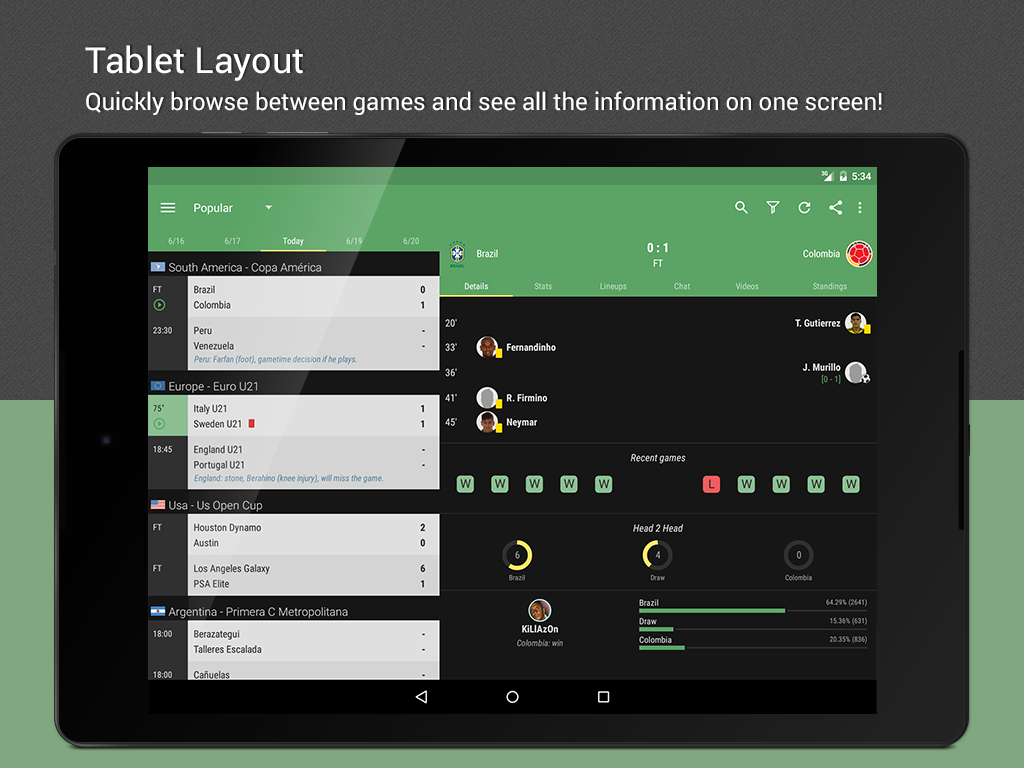
I love my football! I follow the national league (Melbourne City FC), the English Premier League (Tottenham Hotspur), our national team and several other teams from various leagues all over the world. The best app I have found to do all of that in a timely way is All Goals.
This sucker does push notifications for pre game stats, goals, cards, HT, FT the lot. It is actually faster on the update than the official league app for Australia. Seeing as the A-League kicked off this week, I thought it timely to let any football fans I have reading this blog know what's available.
Hope your team wins!
Thursday, April 16, 2015
Android 5.1
My Nexus 5 finally received the Android 5.1 update. It seems to be running a little more smoothly these days. Although it seems to chew through the battery life a little quicker. Not sure if it is due to the fact that I leave Bluetooth on all the time these days to sync with the Fitbit my partner bought me for my birthday in February.
One thing I love about 5.1 is the very simple ability to now choose your wifi network from the slide down menu using the new drop down facility instead of having to multiple click your way through settings. A very simple but effective change.
Subscribe to:
Posts (Atom)
-
I have been using Pocket (formerly "Read it Later" as my go to collecting app. If you are unfamiliar with Pocket, it acts as ...
-
When it comes to GTD, after a year and a half of finding the ultimate solution on Android/Windows, I have settled for Nirvana HQ . Nirv...
-
So, probably the first app I ever tried to manage tasks on Android was GTasks by Dato. It synched with Google Tasks and worked a treat. Pr...