Showing posts with label ChromeOS. Show all posts

Thursday, May 10, 2018

Paperpile has changed my life.

Paperpile has changed my life. For the better!

You know all of those promises about the paperless world changing our lives that only frustrated us and made us become jaded about such a utopia?

The promise Paperpile makes is for real.

This year, I have been accepted into a masters by research program and I needed to look for a solution for the technical bibliography and the inevitable flood of papers that my fantastic supervisors would send my way.

I struggle to be organised. I am organised but it takes effort. The idea of trying to keep several balls in the air, including being across the details of all my research was starting to give me the heeby jeebies.

My previous research efforts involved a combination of Google Docs, MS Word, LibreOffice, Zotero and/or Mendeley. I used Google Docs to do the bulk of the grunt work, and then tried to use various add on's to get the bibliography from Zotero or Mendeley into the document but I had to faff about with MS Word or LibreOffice to manage. I constantly felt discombobulated.

I was certain that I was not the only person who wondered if there was a way to do your citation work inside of Google Docs. And sure enough, after doing some preparation prior to my masters application being accepted, I discovered PaperPile.


PaperPile (for about $3 AUD a month) lives inside of Google Docs. That's it. It all lives inside of Google Docs. No more lost documents, broken computers, hard drive failures, it lives all inside the cloud.

During the free trial period, I started by effortlessly importing my bibliography from Mendeley into PaperPile. Push of a button stuff. And not one formatting error.

Once done, I start writing. When I need to cite, I place the cursor at the correct place in the document and hit the PaperPile icon that appears in the Google Docs ribbon. An unobtrusive search box opens at that point and I start typing. It interrogates my bibliography first. I hit another button and I get some simple formatting options if necessary, otherwise it is that "push button" thing happening again.

The exciting part for me (well there are two, the second of course being it is all online, I am not tied to any particular device) is that if you find articles anywhere, you can add them to your bibliography easily or you can actually use the initial search box to find a/the relevant document you need to cite and with, yes you guessed it, another simple push of the button, add that new document or book to your bibliography.

Like I said, it is about $3 AUD a month, but I would have paid much more than that for the peace of mind I have around this new research project (please don't read that PaperPile! $3 AUD is steep for a student!).

Check it out, see what you reckon.

Wednesday, May 2, 2018

New Gmail

It's been a while between posts. I have been teaching an intensive.

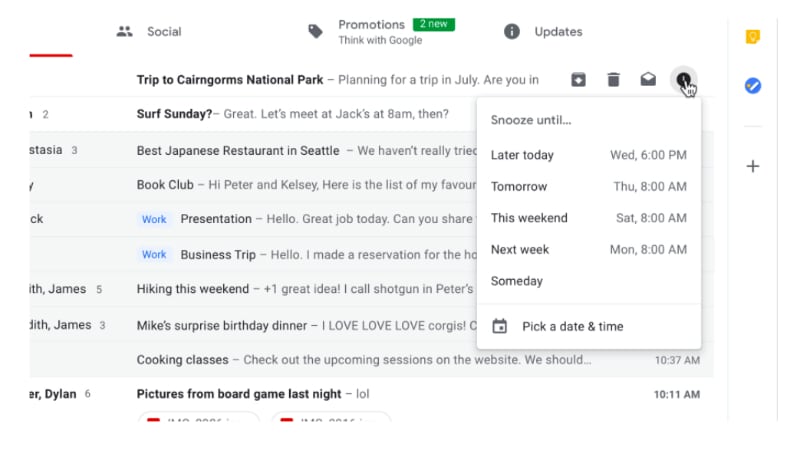
The big news since the last time I have posted is of course the new GMail. There is a bunch of great articles about the features on other sites. There are three things I would like to focus on insofar as the new features are concerned from a productivity point of view.

The first is the snooze function.
Snooze IS AMAZING! You can quickly move through your email inbox and snooze messages that you don't want or have to deal with. This has the effect of being able to use your GMail inbox as a task list. This functionality has been available in Google's Inbox for a long time now, but the difference between this recent GMail change and Inbox is that instead of having to change the way in which you manage your workflow based on how the designers of Inbox think you need to work, you can take this one feature of Inbox and implement it in your GMail based workflow.

The second thing I want to mention is the closer integration between Google Tasks and GMail. Previously you have been able to convert your emails into Calendar appointments but now, you can convert emails into tasks and Google have released a new Tasks app.


Seriously, this app has been a long time coming. It is simple, clean and has a small memory footprint. It is a great front end to the Google Tasks that has existed since they first implemented tasks. Being the productivity geek that I am, I was onto it right away. However, in spite of how this could totally simplify my life, the current implementation lacks tags and/or filters. My workflow heavily influenced by GTD requires that my to do system gives me the ability to see all my tasks but then whittle my list down according to (multiple) contexts. So I have installed the app on my Pixel 2 and Pixelbook and will keep an eye on it each update seeing if the powers that be add this feature some time in the future.

The third thing I want to note is Offline Gmail. Most people are unaware that if you use Chrome, there is actually the ability for you to use Gmail Offline. It has been around for years now however the interface is very 2000's. Buried in the copious detail regarding the new GMail was reference to the fact that in a few weeks after the launch, all of the new goodies will be available in an offline version. Now that is something I am pretty excited about. I will keep you posted on that front.

Monday, April 2, 2018

So much for a week...

In my last post I mentioned that I would be offline for about a week as I recovered from a routine operation. Well that took far more weeks that I thought. Closer to six. I am only just getting back to 100%.

Seeing as I have not been doing allot of work, the thing I have been utilising the most is an app for managing my D&D campaign (that's Dungeons and Dragons for all you non gamer types. And when I say gaming, I mean old school pen and paper D&D.

D&D experienced a downturn in sales when they launched their ill fated D&D 4. Wizards of the Coast, the current owners of the D&D franchise thought they would smash together the successful 3 (and 3.5 update) with Magic The Gathering, the other successful franchise that they own. The result was a terrible hybrid and fans of the game, many who had played the game for decades, abandoned the game in their thousands.

In 2012, WotC released version 5, the unofficially names "We're Sorry" edition. Since then it has experienced quite the resurgence. What has been lacking since 2012 is a slew of digital tools for GM's (Game Masters, the individual in a gaming group that organises all the other players acting as story teller, game administrator etc). Many other companies have tried creating all sorts of cool apps, especially the kind that help the harried GM keep track of all the data necessary to run a long term campaign. Those apps and sites have constantly been harried by WotC's strange approach to licensing.

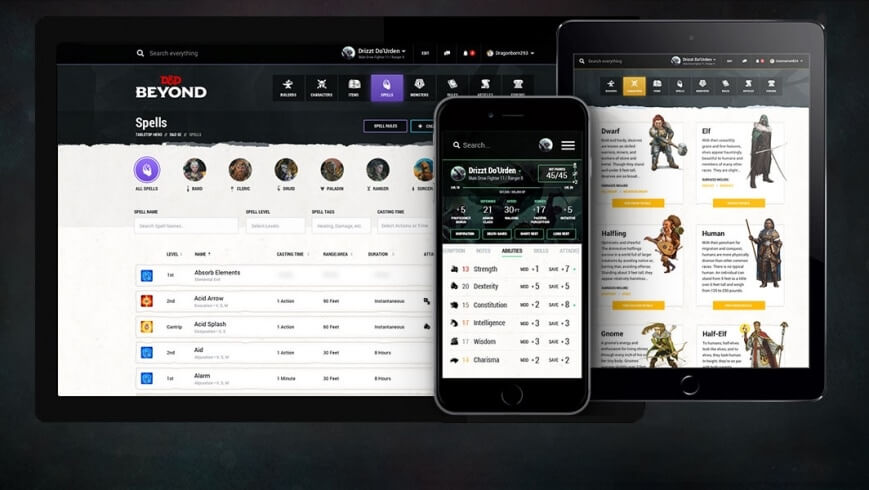
I have used many apps, particularly Android ones (and I am happy to review them if you are interested) however after 5 years of waiting, Dungeons and Dragons Beyond is recently out of beta and available to GM's and players alike.


D&D Beyond is an website, an app, an archive, an online editor with new features slowly but surely being added. I primarily use the web site. Here I have purchased digital versions of the three core books needed to play the game irl. I actually already own the physical versions of the books, however having digital versions available on the website and the app make referencing much faster, therefore speeding up game play.

On the web site, as well as having digital references I have "live" character sheets. These are digital simulacrums of the paper versions, however instead of having to find the page number for the game mechanic of something or other referenced on the paper character sheet, I can just click on the feature on the digital character sheet and in most cases gaming mechanics appear in a drop box without having to leave the sheet. Occasionally the link is to a reference page, however the speed with which you are able to reference immense amounts of data just reinforces how happy my decision to pay some extra money to have digital versions of all of my reference material.

I am still awaiting more features. For you rpg gamer types, I am waiting for things like initiative and HP trackers mainly, however the lure of more powerful world building tools is tempting me to take our a subscription, which for long time readers of my blog, is a big deal (ie: I hate the subscription model).

I primarily use my Pixelbook for research, game writing, and the actual game and then the free Android app when a gaming thought strikes me whilst I am doing something else. Whilst the app is free, you need to unlock the content, however when you unlock the content, it is available across the web site and two mobile devices.

So that is what I have been doing whilst on sick leave.

I hope you don't mind my extending this productivity into my rpg gaming hobby.

Thursday, September 21, 2017

The future of Google devices

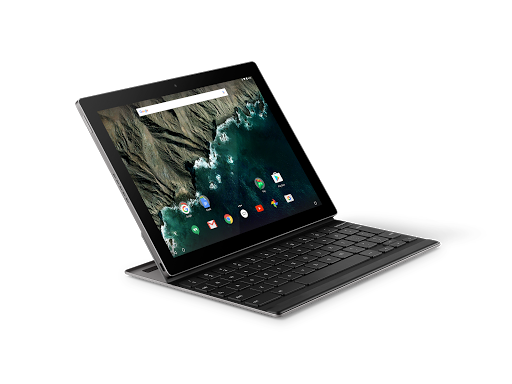
I have started researching the replacement for my Google Pixel C. Don't get me wrong, there is nothing wrong with it at the moment. If anything, after the Oreo update it actually seems to be a little zippier. I am writing this blog post (and doing a ton of other stuff on it today from my local cafe) and all in all, I still think it is the best bit of harward that Google have ever produced.
However, it is only a matter of time before it will not be able to keep up with my needs. So, thinking that I will need to research a replacement in about a years time, I have started looking around.

I swore years ago that I would never get a Samsung device again. The decision was made on the basis of Samsung's way of loading their devices with bloatware and the way in which they bastardise Android. However in terms of the 9 to 10 inch tablet form factor, I do not see that there are many other options.

Two of the possible alternatives are the Remarkable and the recently (as of yesterday) leaked Google Pixelbook.

As a knowledge worker in the area of tertiary education and coaching and professional development, I have found the case for the Remarkable pretty compelling. I mainly read, write and the idea of a device that will not break the concentration (ie: no Twitter, Facebook, Whatsapp interuptions hardcoded into the device) is as I said quite compelling. Check out their Youthube video propaganda and see what you think.


Going the way of the Remarkable would still leave me at a loss insofar as the other tablet related things that I need to do, namely the aforementioned social media messaging, posting and communication. I am unsure as to how the Remarkable interacts with things like Google Drive (which I have a significant investment in) so there would need to do some serious research prior to committing to what from a distance appears to be a really compelling and cool piece of tech.

I have also alluded to the fact that there was a "leak" yesterday in relation to a slew of new Google devices about to be announced in a few weeks time. I was really really hoping that Google would suprise me with an announcement about a replacement for the 2015 Google Pixel C.

I was initially saddened but over the last 24 hours have become not a little bit curious about what the leakers are referring to as the Google Pixelbook.
It appears that the Pixelbook is a Google designed and manufactured Chromebook. (Check out this article on The Verge about yesterdays leak.) This one appears to come with a stylus too, which for me personally has become increasingly important as I have always been the kind of person to carry several paper notebooks and then scanning the contents to Google Drive.

I have never used a Chromebook and have been tempted several times. The ones that seem durable enough for my knockabout lifestyle however start to cost the same as an entry level laptop which has been my most significant point of resistance.

I am cautiously curious about this one however. It seems to be a foldback type laptop so that you can use the device as a tablet. The other points of caution for me are using ChromeOS over Android, the inability to separate the keyboard from the tablet (like the Pixel C) and of course the price.

I will continue to watch with curiosity and see what happens on October the 4th which I believe is the date that Google will be making their annoucements.

Watch this space.

Oh, and of course, if anyone does know of a successor to the Pixel C, drop me a line.


Google News Redux