Showing posts with label Google Pixelbook. Show all posts

Monday, June 18, 2018

Google News Redux

I've been using the new Google News app. Ok, so maybe it is not so new, it's been out for a few months now. Having two Google devices it is had to avoid the app, however, I must say, I am liking it.

Many people have commented on the spookiness of Google using your browsing habits to populate your news feed, however, I am kinda ok with that. It has been fantastic to have my news feed populated with the geopolitical stuff I love reading about (yep, I'm a news junkie) as well as the generic through to the obscure gaming stuff I am interested in too. Everything from E3 press releases through to specific articles on how to prepare your drop deck for specifi missions in the latest release of Battletech the game.


I love the ability to request more articles about specific subject matter and the ability to dive into more articles about the same issue. Adding stuff is pretty straight forward.

On the "Less articles like this" front, I am still a little confused. I mean how many times do I need to do that for NRL articles that it insists on putting into my feed? Not sure what the go is there. Regardless, it is a smalll blip on what has effectively become my morning news read.

Wednesday, May 2, 2018

New Gmail

It's been a while between posts. I have been teaching an intensive.

The big news since the last time I have posted is of course the new GMail. There is a bunch of great articles about the features on other sites. There are three things I would like to focus on insofar as the new features are concerned from a productivity point of view.

The first is the snooze function.
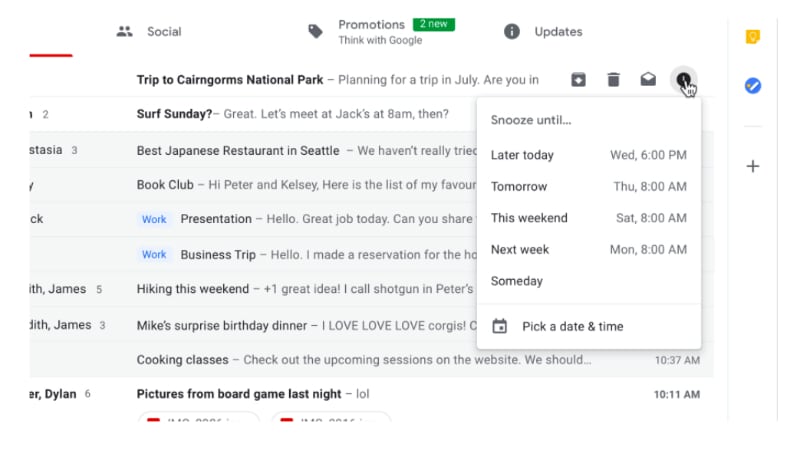
Snooze IS AMAZING! You can quickly move through your email inbox and snooze messages that you don't want or have to deal with. This has the effect of being able to use your GMail inbox as a task list. This functionality has been available in Google's Inbox for a long time now, but the difference between this recent GMail change and Inbox is that instead of having to change the way in which you manage your workflow based on how the designers of Inbox think you need to work, you can take this one feature of Inbox and implement it in your GMail based workflow.

The second thing I want to mention is the closer integration between Google Tasks and GMail. Previously you have been able to convert your emails into Calendar appointments but now, you can convert emails into tasks and Google have released a new Tasks app.


Seriously, this app has been a long time coming. It is simple, clean and has a small memory footprint. It is a great front end to the Google Tasks that has existed since they first implemented tasks. Being the productivity geek that I am, I was onto it right away. However, in spite of how this could totally simplify my life, the current implementation lacks tags and/or filters. My workflow heavily influenced by GTD requires that my to do system gives me the ability to see all my tasks but then whittle my list down according to (multiple) contexts. So I have installed the app on my Pixel 2 and Pixelbook and will keep an eye on it each update seeing if the powers that be add this feature some time in the future.

The third thing I want to note is Offline Gmail. Most people are unaware that if you use Chrome, there is actually the ability for you to use Gmail Offline. It has been around for years now however the interface is very 2000's. Buried in the copious detail regarding the new GMail was reference to the fact that in a few weeks after the launch, all of the new goodies will be available in an offline version. Now that is something I am pretty excited about. I will keep you posted on that front.

Monday, January 22, 2018

The most used Pixelbook app this week is...

Gmail. The Pixelbook (obviously) comes with Chrome OS. By default, you get Offline Gmail (check out this and this if you didn't know you could use Gmail offline in your Chrome browser and you want to learn how) in Chrome OS and the Pixelbook comes with a shortcut link.

However, as cute as offline Gmail in Chrome is, I am just used to using the Gmail Android app on the Pixel C.

So this week, whilst I am technically back at work, not everyone else that I need to interact with as part of my current working arrangements are, so I am emailing away like a champion and using the Android app to do it. Maybe I will revisit Offline Gmail, but for now, the winner is Gmail for Android.

Wednesday, January 17, 2018

The Pixelbook has landed for a happy new year

What a debacle it took me to get this Pixelbook! (Which I am finally on, YAY! More on that in a second.)

For some reason, back in November of 2017, Google were not delivering Pixelbooks to Australia. So I had to get a US based friend of mine to do the old "send it on" for me. The great frustration was that when FedEx failed to deliver (to an apartment in downtown San Francisco occupied by four people!), they sent it back to Google.

Google then organised a new delivery as part of the insurance coverage which I ordered on the original device which was cancelled because of their screwy ordering system. When the insurance replacement device arrived, Google had to organise to pick it up (so the third device which was part of the second order) could be dispatched. Except, Google could only order a pick up from my Australian address!

Long and short of it was the device I ordered in November arrived in the second week of January. What a chore!

BUT, it is here and I am loving it.

I will keep this first post of the new year short.

CONS:

  • It is heavy. Heavier than the Pixel C.
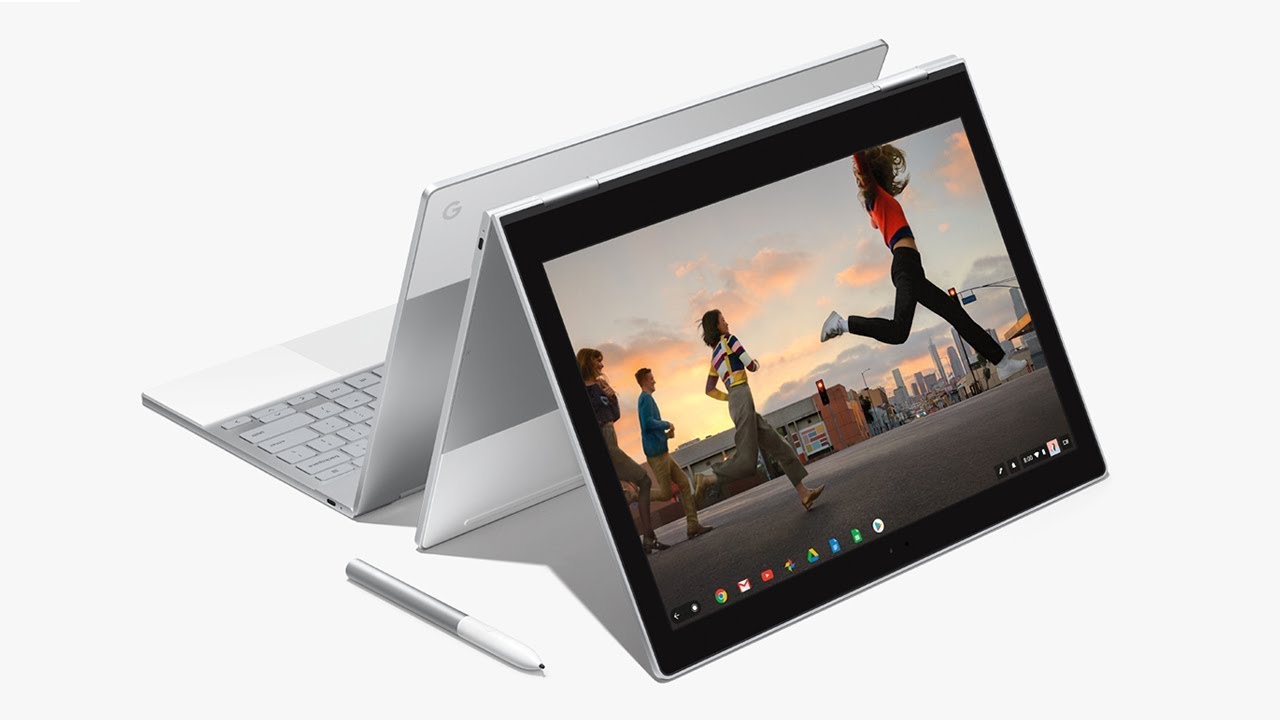
  • Bending it into "tablet mode" still feels a little cumbersome and unnatural (ie: holding a tablet with keys on the back of the tablet.
PRO's: Where do I start?

  • The "on in seconds" feeling is great. Two seconds and I am working.
  • Android apps on Chrome OS is amazing, and I hate the hipster use of "amazing" and "perfect". The implementation of Android apps is close to flawless. Which means my significant investment in Android apps over the years is not lost in the transition to the Pixelbook.
  • The hardware is such that my Mac lovin friends are like "wow". However it is not excellent because it makes people envious. Google have really thought through the design of this thing. It looks great, it feels great to use. The keyboard, the track pad, jacks and slots, nothing short of excellent quality.
  • Split screen? Apparently split screen is coming to Chrome OS on the Pixelbook, however I just don't need it. I mainly use Android apps and most of them when resized appear as thin panels. I can have several open at a time. It is actually more productive than the Pixel C in split screen.
  • OS is fast, zippy and super solid.
That is my short summary so far. I will write more about this in the next few weeks but needless to say, really impressed and really happy with this new kit.

Let us know about your Pixelbook experience and of course, if you have any questions, just ask!

Monday, December 18, 2017

Oh Google, what have you done? Or "reevaluating my life choices..."

I have to admit, my patience as a Google fanboy are growing thin.

Firstly on the Pixel C drama. Well, to be honest, Google were pretty good here. I did the old "hit the button in the support section on your Android phone" and I got a call back from Google within 3 minutes. They were great and I had my replacement Pixel C dispatched the same day and within a few days I was back on the horse. So full marks to Google there.

Then there was what I am calling the great Pixelbook ordering fiasco.

I bit the bullet and decided that I will replace my Pixel C with a Pixelbook

So I jumped onto the Google store and problem #1, for some reason Google will not deliver the new Pixelbook to Australia. I will explain why this is really crazy in a minute.

So I organise a friend of mine who lives in San Francisco to be my go to person. I set up her address as my US based delivery address. Order the Pixelbook, a cover, a pen and the extra insurance on the device.

Google use FedEx and I have to say that for my first experience of FedEx, I am underwhelmed to say the least. FedEx were unable to deliver the package to an apartment in downtown San Francisco, which is shared by three people, of which at least one person was in the apartment during the times FedEx claimed they attempted delivery. For whatever reason, FedEx indicated they were unable to deliver the device, so rather than leave it at a local FedEx or UPS depot to be picked up when it was convenient for my friend to do so (even though she or one of her friends were present the whole time), FedEx decided to send the package back to Google. Yep, you read that right. But wait, there’s more!

In my conversations with Google, they can’t just try to resend, they need to cancel the order and I need to start all over again. I do so. I wait for the credit hold on my credit card to release the funds back to me, replace the order, only to get another email from Google saying that the insurance department (remember, my first order included insurance) had been notified that my initial device was not delivered, and a replacement unit had been dispatched. This is after the initial order had been cancelled and my account had been credited with the initial amount.

When I placed the second order, the Google store informed me that the pens and covers were out of stock. (I ordered a cover and a pen from Amazon instead, who delivered those items directly to my Australian address.)

Spoke to Google again, they tried to arrange a pick up of the insurance replacement device (from the first purchase) that had been dispatched, yet their system would only allow a pickup of the device from my Australian address, not the US address. So Google’s system can only deliver a Pixelbook to a US based address, but it can only pick up a faulty device from my Australian address. No words.

Anyways, after a couple of weeks faffing about, we got it sorted and here I sit, in Australia with my Pixelbook cover and pen, eagerly awaiting the arrival of the actual Pixelbook itself that was dispatched by my kind and long suffering San Fransico sister!

I head off to my local cafe to give an update on these series of dramas where I usually blog from, only to discover that the Oreo 8.1 update on my Google Nexus 5X has broken the wifi hotspot function. (News flash: If you are not able to tether on any Google phone you own that has been updated to 8.1, it is an official bug!)

So I end where I started, oh Google, what have you done?

I trust that when the Pixelbook finally arrives (hopefully before Christmas, Merry Christmas me!) all of the dramas will be forgotten and I will be filled with new purchase endorphins and extolling the virtues of this wonderful piece of new kit!  

Friday, October 27, 2017

Oero 8.0 = Pixel C Hell

Ever since I downloaded Oreo for the Pixel C, it has been hell on a jetski.

I have had no problems on my Pixel C. Ever.

I download Oreo and I get the dreaded dark screen (your Pixel C turns on but the screen is so dark you cannot read any of the screen prompts), reboots, split screen fritz and random reboots.

If I was cynical I would suggest that Google put code in Oreo to make Pixel C users so frustrated that they purchase the Pixelbook out of frustration.

Seriously very poor form from Google.

I have two options as far as I can see it.

  1. Purchase the new Pixelbook which I was going to anyway.
  2. Enrol the Pixel C in the Android Beta program (https://www.google.com/android/beta)
The problem with most of the reviews of the Pixelbook is that reviewers are largely comparing it to other Ultrabooks. Few reviewers are comparing it to other Android tablets.

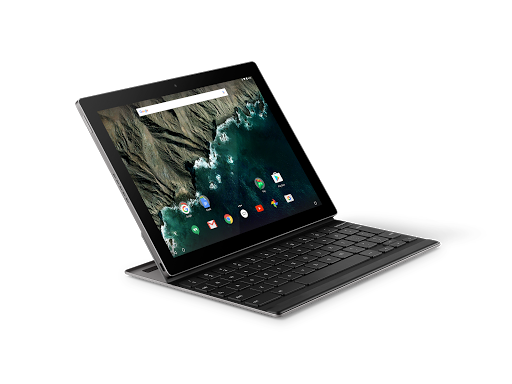
I read one article that suggested that the reality is the Pixelbook is the new Google Android tablet and that is the future. I am a little bumbed that you can't detatch the keyboard but there would be no point to that as it is primarily a Chomebook.

Regardless, I am going to enrol my trust Pixel C in the beta program and see if that does not fix the fritzing problem because I would rather choose to upgrade my hardware according to my own timeline rather than Googles.

Thursday, September 21, 2017

The future of Google devices

I have started researching the replacement for my Google Pixel C. Don't get me wrong, there is nothing wrong with it at the moment. If anything, after the Oreo update it actually seems to be a little zippier. I am writing this blog post (and doing a ton of other stuff on it today from my local cafe) and all in all, I still think it is the best bit of harward that Google have ever produced.
However, it is only a matter of time before it will not be able to keep up with my needs. So, thinking that I will need to research a replacement in about a years time, I have started looking around.

I swore years ago that I would never get a Samsung device again. The decision was made on the basis of Samsung's way of loading their devices with bloatware and the way in which they bastardise Android. However in terms of the 9 to 10 inch tablet form factor, I do not see that there are many other options.

Two of the possible alternatives are the Remarkable and the recently (as of yesterday) leaked Google Pixelbook.

As a knowledge worker in the area of tertiary education and coaching and professional development, I have found the case for the Remarkable pretty compelling. I mainly read, write and the idea of a device that will not break the concentration (ie: no Twitter, Facebook, Whatsapp interuptions hardcoded into the device) is as I said quite compelling. Check out their Youthube video propaganda and see what you think.


Going the way of the Remarkable would still leave me at a loss insofar as the other tablet related things that I need to do, namely the aforementioned social media messaging, posting and communication. I am unsure as to how the Remarkable interacts with things like Google Drive (which I have a significant investment in) so there would need to do some serious research prior to committing to what from a distance appears to be a really compelling and cool piece of tech.

I have also alluded to the fact that there was a "leak" yesterday in relation to a slew of new Google devices about to be announced in a few weeks time. I was really really hoping that Google would suprise me with an announcement about a replacement for the 2015 Google Pixel C.

I was initially saddened but over the last 24 hours have become not a little bit curious about what the leakers are referring to as the Google Pixelbook.
It appears that the Pixelbook is a Google designed and manufactured Chromebook. (Check out this article on The Verge about yesterdays leak.) This one appears to come with a stylus too, which for me personally has become increasingly important as I have always been the kind of person to carry several paper notebooks and then scanning the contents to Google Drive.

I have never used a Chromebook and have been tempted several times. The ones that seem durable enough for my knockabout lifestyle however start to cost the same as an entry level laptop which has been my most significant point of resistance.

I am cautiously curious about this one however. It seems to be a foldback type laptop so that you can use the device as a tablet. The other points of caution for me are using ChromeOS over Android, the inability to separate the keyboard from the tablet (like the Pixel C) and of course the price.

I will continue to watch with curiosity and see what happens on October the 4th which I believe is the date that Google will be making their annoucements.

Watch this space.

Oh, and of course, if anyone does know of a successor to the Pixel C, drop me a line.


Google News Redux