Showing posts with label Apps. Show all posts

Tuesday, October 18, 2016

Tiny Scanner, a simple gem.

Simplicity itself. All I needed was an app that would a) allow me to take a photo of a document or use a preexisting image and b) create a pdf of the image and then c) allow me to append new photo's/images to the document. Icing on the cake would be the ability to alter the order of the pages in the pdf.

App after app all failing in one of the three aforementioned categories and then BOOM, Tiny Scanner.

The app has a small memory footprint, is (as far as I can tell) add/bug free and simplicity itself to use. If you need a way to quickly make your own pdf's out of your own images, with an append and/or page rearrange function, this is your baby.

I may even pay for it!

Monday, November 24, 2014

Think Facebook's separate Chat App is bollocks?

If, like me, the thought of installing a second bloated Facebook app on your Android app was a bit of bollocks, this might be of interest to you.

The chat function is not dead in the Facebook app, its just been disabled.
If you head over to this Life Hacked link, you can find a link to Facebook Chat Reenabler, and you are on your way!

Friday, October 17, 2014

My Handwriting Nirvana

I have tried a whole bunch of handwriting apps and I've blown a whole bunch of cash on several too. I couldn't find one that worked so I settled for using a physical notebook and would take photo's of the pages, scanning them into Evernote (which then hooked into Zendone, my GTD app.) It kind of worked but I found both editing notes on the Android Evernote app and Skitch to be flaky.

So I continued to look for an option.

I can't remember how I stumbled upon Inkredible.

I vaguely recall looking for a handwriting app that has a "palm rejection" facility which Inkredible does. However, it was not the part of Inkredible that drew me. 

The first thing was its responsiveness. I use an Adonit Jotpoint and I found no stutter whatsoever. That is a big statement. Every other handwriting app I have ever used has stuttered at some point. Some more than others. Yet with Inkredible, no stutter.

The second aspect I appreciate is the quality of the various "brushes" or tools which include a fountain and calligraphy pen excellent. (Some free, some you need to purchase as an In App Purchase.) It is also able to detect various forms of pressure of your writing device. More pressure, the thicker the line.

You can chose various types of backgrounds (again some free and other an available as an In App Purchase) and the ability to move through your pages using a two finger page turning technique, or by long pressing on the edge of the page to bring up a quick scroll function.

You also have the standard option of sharing your pages into other apps.

As I was thinking about what I wanted to blog about next, I realised that not only have I not used my physical notebook for about a month now, but I have added the Inkredible icon to my main home screen. It is an app I use several times a day and has resulted in less items in my bag. This reflection answered my question. This app has improved my productivity significantly. Give it a crack and let me know what you reckon.

Monday, July 28, 2014

Pray as you go website and app


There is quite an interest in Australia in the area of mindfulness at the moment. This is something I am quite interested in, particularly the area of mindfulness withing the historical Christian tradition, which is ironically often at odds with popular Christianity (ie: the kind that is often found in the media and often for all the wrong reasons.)

My friend and colleague Christop Booth was facilitating a reflection for our staff retreat a few weeks ago. He was leading us through a reflection on the contemplative life.

One of the many things he covered was a great little resource that I have been using since then. It took me a while to find it, so I thought I would share it with you. It is an app (and a website) called “Pray as you go.
It is based on the Ignatian way of praying and follows the Roman Catholic lectionary.

If you know your Myers Briggs profile, Ignatian Spirituality works really well for ISTJ, ESTJ, ISFJ and ESFJ types.

Being an INTJ, it kind of works for me, however I appreciate the thoughtfulness they put into the app and the fact that it is a nice clean Android app that follows the lectionary.

I hope you find it as helpful as I do?

PS - There are some good kids resources available within the app too!

Wednesday, February 5, 2014

Group text and email on Android

I still can't believe that the Gmail app on Android, in 2014, will not allow you to interact with your GMail groups! It is crazy to think that you need a third party app to send emails and texts to your GMail groups this late in the technology game.

I understand that they are trying to discourage spam masters from clogging the internet from their mobile devices, but there should be another way.

Enter "Group SMS & Scheduler". It's ugly, but in terms of functionality, it is the best one I have been able to find. It still seems a bit of a convoluted process and I live in hope that one day Google will make the functionality available natively. Until then, give this one a crack.

Saturday, January 11, 2014

Mashable


One of the news sources that I use had a series of interesting articles. They are behind a paywall so I thought I would seek out the source of their articles.

It turns out it was Mashable. I downloaded their Android app immediately. I use it at least everyday. I have found it to be smooth, simple, elegant and clean. In addition, their articles are great!


Sunday, December 1, 2013

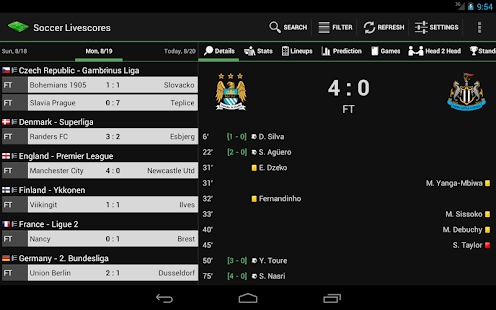
Confirming my pain... Soccer Livescores App

I am an Australian fan of the world game (football in most places around the world, and soccer in the USA, some parts of Australia and other parts of the world).

At the moment, I am experiencing quite a bit of pain with my beloved Melbourne Heart rooted at the bottom of the A-League table with no apparent plans to go anywhere. I am also a massive Tottenham Hotspur fan as well as interested in Fiorentina in the Italian Serie A and Shimizu S-Pulse in the Japanese J-League.

The wonderful app Soccer Livescores is my app of choice when trying to keep in touch with the many different teams I follow in the many leagues around the world.

Wednesday, November 13, 2013

Falling in love with Currents again

I use a combination of GReader Pro and Pocket for my news reading. Over the last week, I have started using Google Currents again. It is simple, clean and very easy to share articles from (although there is a trick to it, you need to tap the article title to get the sharing bar to pop up).

I whimsically installed Flipboard again to try it out but found that it didn't quite do it for me. I flicked over to Currents to see what was new and was surprised to see it has simplified even further and scales really nicely between small and large screens.

Give it a try if you haven't already. See what you reckon.

Saturday, February 2, 2013

Apps - Cloudmagic

I work in a mixed environment. Android, Windows and Mac. Our organisation has a BYOD policy too.

In such an environment, even thought we use Dropbox as a team, various staff members use a range of different cloud based solutions for file storage.

I would often find myself spending a little bit of time trying to figure out of that shared file we were working on was emailed to me, in Dropbox, in Evernote etc.

Enter this little life saver of an app. Cloudmagic connects to a whole bunch of cloud based storage services and will search across them for you helping you quickly find the file in question. I probably use it once a week but I reckon it saves about 15 minutes each time I do. Give it a crack and let me know what you reckon.

Saturday, January 5, 2013

Best office app on Android? My vote goes to Polaris Office.


When I bought my ASUS Transformer TF101, it came with an unassuming app called Polaris Office. I have not realised just how much I have come to appreciate this elegant, well designed and very sturdy piece of software.
I upgraded my TF101 to the Prime (TF201) and it also came with Polarise Office as a part of the stock software.
I recently upgraded phones and was looking through the app store for Polaris. I found it but I was not able to install it on any of my devices. Got the old “not valid in your country” rubbish! I guess I will have to wait before the company feels confident enough to go public on Android with it.
Better go write my letter to Santa!

Google News Redux