Showing posts with label Offline Gmail. Show all posts

Wednesday, May 2, 2018

New Gmail

It's been a while between posts. I have been teaching an intensive.

The big news since the last time I have posted is of course the new GMail. There is a bunch of great articles about the features on other sites. There are three things I would like to focus on insofar as the new features are concerned from a productivity point of view.

The first is the snooze function.
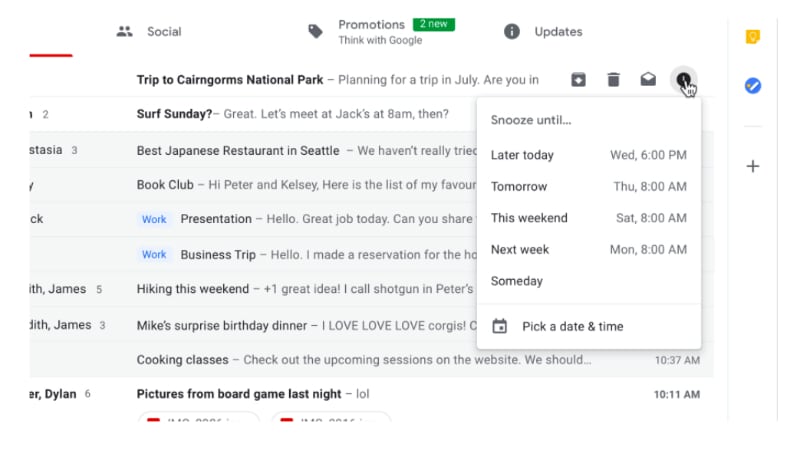
Snooze IS AMAZING! You can quickly move through your email inbox and snooze messages that you don't want or have to deal with. This has the effect of being able to use your GMail inbox as a task list. This functionality has been available in Google's Inbox for a long time now, but the difference between this recent GMail change and Inbox is that instead of having to change the way in which you manage your workflow based on how the designers of Inbox think you need to work, you can take this one feature of Inbox and implement it in your GMail based workflow.

The second thing I want to mention is the closer integration between Google Tasks and GMail. Previously you have been able to convert your emails into Calendar appointments but now, you can convert emails into tasks and Google have released a new Tasks app.


Seriously, this app has been a long time coming. It is simple, clean and has a small memory footprint. It is a great front end to the Google Tasks that has existed since they first implemented tasks. Being the productivity geek that I am, I was onto it right away. However, in spite of how this could totally simplify my life, the current implementation lacks tags and/or filters. My workflow heavily influenced by GTD requires that my to do system gives me the ability to see all my tasks but then whittle my list down according to (multiple) contexts. So I have installed the app on my Pixel 2 and Pixelbook and will keep an eye on it each update seeing if the powers that be add this feature some time in the future.

The third thing I want to note is Offline Gmail. Most people are unaware that if you use Chrome, there is actually the ability for you to use Gmail Offline. It has been around for years now however the interface is very 2000's. Buried in the copious detail regarding the new GMail was reference to the fact that in a few weeks after the launch, all of the new goodies will be available in an offline version. Now that is something I am pretty excited about. I will keep you posted on that front.

Monday, January 22, 2018

The most used Pixelbook app this week is...

Gmail. The Pixelbook (obviously) comes with Chrome OS. By default, you get Offline Gmail (check out this and this if you didn't know you could use Gmail offline in your Chrome browser and you want to learn how) in Chrome OS and the Pixelbook comes with a shortcut link.

However, as cute as offline Gmail in Chrome is, I am just used to using the Gmail Android app on the Pixel C.

So this week, whilst I am technically back at work, not everyone else that I need to interact with as part of my current working arrangements are, so I am emailing away like a champion and using the Android app to do it. Maybe I will revisit Offline Gmail, but for now, the winner is Gmail for Android.

Wednesday, January 29, 2014

Offline Gmail Tizzy

I use Offline Gmail. It is really hand on the train, going through tunnels and underground stations. It works mainly like the full blown website with minimal limitations. You email to your hearts content and when the browser detects a connection, it squirts the emails in your outbox on their way and retrieves your incoming emails from Google's servers. Really nice. No need for an email client.

Yesterday I had to change my password (long story) and it sent Offline Gmail into a bit of a tizzy. Resetting Offline Gmail is a bit of an archaic exercise so I thought I would share the link here with others.

This is what you need to do to unbunch Offline Gmail's panties when they all get in a twist when you do something like change a password on the server.

Google News Redux