It's been a while between posts. I have been teaching an intensive.
The big news since the last time I have posted is of course the new GMail. There is a bunch of great articles about the features on other sites. There are three things I would like to focus on insofar as the new features are concerned from a productivity point of view.
The first is the snooze function.
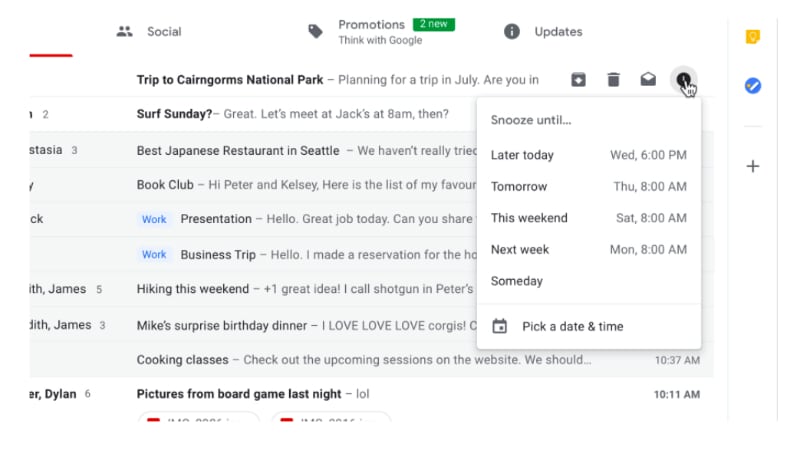
Snooze IS AMAZING! You can quickly move through your email inbox and snooze messages that you don't want or have to deal with. This has the effect of being able to use your GMail inbox as a task list. This functionality has been available in Google's Inbox for a long time now, but the difference between this recent GMail change and Inbox is that instead of having to change the way in which you manage your workflow based on how the designers of Inbox think you need to work, you can take this one feature of Inbox and implement it in your GMail based workflow.
The second thing I want to mention is the closer integration between Google Tasks and GMail. Previously you have been able to convert your emails into Calendar appointments but now, you can convert emails into tasks and Google have released a new Tasks app.
Seriously, this app has been a long time coming. It is simple, clean and has a small memory footprint. It is a great front end to the Google Tasks that has existed since they first implemented tasks. Being the productivity geek that I am, I was onto it right away. However, in spite of how this could totally simplify my life, the current implementation lacks tags and/or filters. My workflow heavily influenced by GTD requires that my to do system gives me the ability to see all my tasks but then whittle my list down according to (multiple) contexts. So I have installed the app on my Pixel 2 and Pixelbook and will keep an eye on it each update seeing if the powers that be add this feature some time in the future.
The third thing I want to note is Offline Gmail. Most people are unaware that if you use Chrome, there is actually the ability for you to use Gmail Offline. It has been around for years now however the interface is very 2000's. Buried in the copious detail regarding the new GMail was reference to the fact that in a few weeks after the launch, all of the new goodies will be available in an offline version. Now that is something I am pretty excited about. I will keep you posted on that front.
Trying to get stuff done on my Pixel 2 and Chrome OS Pixelbook! Productivity tips, GTD apps and other stuff!
Showing posts with label Productivity. Show all posts
Wednesday, May 2, 2018
Monday, February 26, 2018
With a Pixel 2 and a Kindle Paperwhite...
I am heading into the local hospital for a routine procedure. They recommend that you do not take anything of value into the hospital with you, so no Pixelbook for me!
I am however going to take my trusty Pixel 2 and my Kindle Paperwhite as both devices are covered by my insurance arrangements so no stress there. It is an overnight stay and I have a little bit of work that I need to do, so it will be interesting to see how much I can get through with a couple of devices. I suspect that reading will be the main game due to all the waiting, sitting around etc, so let's see how productive I can be with the two devices.
Thursday, February 1, 2018
Rocking out with Dynalist
So I am on the cusp of some major changes. I am moving into masters thesis mode and also in the throes of formalising much of the coaching and mentoring that I do. It was ironic that my passion for old fashioned pen and paper role playing was the avenue through which my latest discovery regarding how I can organise my thesis writing and mentoring related notes in order. Enter Dynalist.
The limitations I found in Workflowy that are rectified in Dynalist are:
If you have ever used Workflowy, Dynalist is Workflowy plus all the nice things you wished Workflowy had.
For those of you who do not know Workflowy or Dynalist, to quote Workflowy's own blurb:
organizational tool that makes life easier. It's a surprisingly powerful way to take notes, make lists, collaborate, brainstorm, plan and generally organize your brainImagine an online (with offline apps) WYSIWYG editor that makes collapsible lists using powerful word processing functionality, that can also be taggable and lends itself to (check)list making.
The limitations I found in Workflowy that are rectified in Dynalist are:
- The ability to very easily (compared to Workflowy) embed links in your text but more importantly embed links in your text to other parts of your writing. Indeed when you use the double "[[" function, Dynalist presents a search box and you can easily find the part of your own document to create a link to.
- MULTIPLE DOCUMENTS! Workflowy forces you to work from one ginormous document. Dynalist allows you to create separate work spaces which, even though you can simulate this is Workflowy, I just feel a little more psychologically free in Dynalist.
It may seem petty that two simple functions serve as a deal breaker in my mind, however once you use Dynalist's tagging function, everything else seems archaic in comparison.
In addition, these features also were significant in my move...
- Offline apps.
- Platform agnostic (I am working from a Google Pixelbook and Nexux 5X phone with occasional Windows 10 PC use, nothing I can't do on the Pixelbook though, just nice to work on a huge screen occasionally).
So I have set up a huge document to manage a Star Wars role playing game that I will be running for my sons. The ability to hoover up information and rapidly organise it in Dynalist made me start thinking about my thesis and then of course my thinking tumbled into taking my mentoring more seriously as I move to organise it a little better.
If you are on the cusp of an organisational revolution, check out Dynalist.
Oh, did I say that the vast majority of the awesome tools are available on the free version!?
Friday, February 19, 2016
Google Now
When I think about what I will blog about here, I grab my phone or tablet and spend a few seconds thinking about the apps that I use on a regular basis that help me be productive.
Today, not only did I think about Google Now, but I also thought about how it is such a seemless part of my daily prooductivity routine that I almost did not realise that this was the case.
There is something about using an app like that, one that becomes so seamless, so much a part of the way in which you work and play that you don't realise that it has become part of your subconcious routines.
Weather, package tracking and delivery, travel, timetabling, right down to suggesting stories it grabs from the web based upon my search and reading habits, Google Now is very much a part of the way I work.
I was most delighted with a recent update to the app. I recently had an organisation book travel for me as part of my work, and Google Now took the flight information from the confirmation emails, added it to my Google calendar, and gave me timely reminders without my having to lift a digital finger.
If you are not using Google Now, give it a shot. It can feel a little intrusive, and sometimes I still get a pang along those lines, however dip into it and turn it on (you need to opt in to Google Now) and give it a whirl for a few months. See what you reckon.
Today, not only did I think about Google Now, but I also thought about how it is such a seemless part of my daily prooductivity routine that I almost did not realise that this was the case.
There is something about using an app like that, one that becomes so seamless, so much a part of the way in which you work and play that you don't realise that it has become part of your subconcious routines.
Weather, package tracking and delivery, travel, timetabling, right down to suggesting stories it grabs from the web based upon my search and reading habits, Google Now is very much a part of the way I work.
I was most delighted with a recent update to the app. I recently had an organisation book travel for me as part of my work, and Google Now took the flight information from the confirmation emails, added it to my Google calendar, and gave me timely reminders without my having to lift a digital finger.
If you are not using Google Now, give it a shot. It can feel a little intrusive, and sometimes I still get a pang along those lines, however dip into it and turn it on (you need to opt in to Google Now) and give it a whirl for a few months. See what you reckon.
Monday, February 23, 2015
Google Drive Folder Shenanigains
Our organisation uses Dropbox and I have to say, I hate it. Trying to work collaboratively with about 40 staff is painful. I cannot recall the number of times someone moves a folder shared with them, only to make it unaccessible to the rest of the cohort sharing the folder or worse, deleting it for them.
I have been using Dropbox for so long I assumed that this was the case for Google Drive too. Not so! I just moved a folder shared with me by another organisation using Google for Work (old Google Apps) and no problems whatsoever! Loving life!
Monday, November 17, 2014
Obligatory Google Inbox Update
Yes I was one of the lucky ducks who got an invitation to Google Inbox. Coming from a GTD background, I was generally distressed that the only context you get to choose from is a physical location. This is pretty handy. The only other way to sort tasks is via date. So the vast majority of my tasks which have to do with contexts rather than places or dates are not processable using Inbox's current setup.
I have left a suggestion that you should be able to label you email and reminder tasks with more than one label. This will give me the ability to check out all my tasks tagged "@Calls" for example and then differentiate between @Personal @Calls and @Work @Calls.
If this is available in an update, I reckon I will give it another bash. Otherwise I will keep using Zendone.
I have left a suggestion that you should be able to label you email and reminder tasks with more than one label. This will give me the ability to check out all my tasks tagged "@Calls" for example and then differentiate between @Personal @Calls and @Work @Calls.
If this is available in an update, I reckon I will give it another bash. Otherwise I will keep using Zendone.
Friday, October 17, 2014
My Handwriting Nirvana
I have tried a whole bunch of handwriting apps and I've blown a whole bunch of cash on several too. I couldn't find one that worked so I settled for using a physical notebook and would take photo's of the pages, scanning them into Evernote (which then hooked into Zendone, my GTD app.) It kind of worked but I found both editing notes on the Android Evernote app and Skitch to be flaky.
So I continued to look for an option.
I can't remember how I stumbled upon Inkredible.
I vaguely recall looking for a handwriting app that has a "palm rejection" facility which Inkredible does. However, it was not the part of Inkredible that drew me.
The first thing was its responsiveness. I use an Adonit Jotpoint and I found no stutter whatsoever. That is a big statement. Every other handwriting app I have ever used has stuttered at some point. Some more than others. Yet with Inkredible, no stutter.
The second aspect I appreciate is the quality of the various "brushes" or tools which include a fountain and calligraphy pen excellent. (Some free, some you need to purchase as an In App Purchase.) It is also able to detect various forms of pressure of your writing device. More pressure, the thicker the line.
You can chose various types of backgrounds (again some free and other an available as an In App Purchase) and the ability to move through your pages using a two finger page turning technique, or by long pressing on the edge of the page to bring up a quick scroll function.
You also have the standard option of sharing your pages into other apps.
As I was thinking about what I wanted to blog about next, I realised that not only have I not used my physical notebook for about a month now, but I have added the Inkredible icon to my main home screen. It is an app I use several times a day and has resulted in less items in my bag. This reflection answered my question. This app has improved my productivity significantly. Give it a crack and let me know what you reckon.
Friday, August 1, 2014
Trello
It rhymes with Jello! That's one of the things I remember from the introductory video. I am a bit of a GTD geek, like to be organised, and like (and need to) organise others.
I have toyed with the idea of using Trello because it just seems like the kind of thing that is visual, simple and nice. The Android app is an almost exact duplicate of the web based experience (which is also pretty sweet).
If you are managing a fluid and dynamic project that involves tasks that are composed of multiple steps, and that require moving tasks between group members as each member needs to contribute small amounts to the task, Trello just might be the tool for you.
I'd love to hear from those who use it regularly too.
Posted via Blogaway
Wednesday, February 5, 2014
Group text and email on Android
I still can't believe that the Gmail app on Android, in 2014, will not allow you to interact with your GMail groups! It is crazy to think that you need a third party app to send emails and texts to your GMail groups this late in the technology game.
I understand that they are trying to discourage spam masters from clogging the internet from their mobile devices, but there should be another way.
Enter "Group SMS & Scheduler". It's ugly, but in terms of functionality, it is the best one I have been able to find. It still seems a bit of a convoluted process and I live in hope that one day Google will make the functionality available natively. Until then, give this one a crack.
Thursday, September 5, 2013
Zendone: You really need to check this out!
Once again, whilst waiting for the development of the beta client for my web based GTD system, I discovered Zendone. I have to say I am sorely tempted!
Zendone's web based interface has quite a beautiful aesthetic. I downloaded the Android client from the Google Play store and it is still quite crude in terms of functionality. You are unable to sort tasks by context, nor does it neatly replicate the web based views that you may have set up. If they can nail these things down quickly (which I believe they are as I consulted their published roadmap) it will be very difficult for me to justify staying with Nirvana.
The reason being is that Zendone integrates incredibly well with both Evernote and Google Calendars. I will keep an eye on the development of the Android app and keep you posted. Exciting times for Android GTD'ers...
Zendone's web based interface has quite a beautiful aesthetic. I downloaded the Android client from the Google Play store and it is still quite crude in terms of functionality. You are unable to sort tasks by context, nor does it neatly replicate the web based views that you may have set up. If they can nail these things down quickly (which I believe they are as I consulted their published roadmap) it will be very difficult for me to justify staying with Nirvana.
The reason being is that Zendone integrates incredibly well with both Evernote and Google Calendars. I will keep an eye on the development of the Android app and keep you posted. Exciting times for Android GTD'ers...
Monday, August 26, 2013
While I'm waiting for my GTD app...
While I'm waiting for NirvanaHQ to get their beta to a relatively stable place, I have been exploring other GTDbaseed solutions. Since I've started down this track, things like being able to tag a task with multiple contexts and sync across multiple devices have become mandatory necessities for me.
With that in mind, I found todo.txt. This text based GTD app is brilliant. It uses Dropbox to sync a simple text file that you can edit directly using a simple syntax on a desktop/laptop computer. It is small, simple and fast. I seriously contemplated covering over to todo.tx. The only thing that held me back was the lack of a decent desktop based rapid entry facility.
I still however highly recommend you check it out if you are looking for a small simple GTD based system for Android.
Saturday, February 9, 2013
Another GTD Contender - Openloopz
There was a slight setback in my GTD life this week. NirvanaHQ have decided to pull the pin on their current Android app direction. They will be looking at developing a new Android app from scratch and it may be a couple of months before we see anything. That means I am left with a second version of the beta. It is functional but as you would expect, buggy.
That means that the 2nd place prize winner is back in my focus once again. I haven't written about Openloopz but I have to say, this little app is quite the cracker!
OpenLoopz, IMHO tick's just about all of the boxes, and the ones it doesn't are being developed.
That means that the 2nd place prize winner is back in my focus once again. I haven't written about Openloopz but I have to say, this little app is quite the cracker!
OpenLoopz, IMHO tick's just about all of the boxes, and the ones it doesn't are being developed.
- Firstly, it is a very pure implementation of GTD, complete with what I consider to be the Holy Grail on an Android platform, auto next action.
- Secondly, it is a smooth, bug free, fast light app. It is a pleasure to use. Seriously, you should check it out. If only the majority of Android apps were both as smooth and aesthetically pleasing.
- OpenLoopz also has a handy little geo location dimension to it. If you tag geographical contexts (like @Home and @Work as opposed to @Computer etc) your list of active tasks will be based upon your location. Very very handy, certainly for someone like me.
The reason why it doesn't have a five star rating from me (and indeed the reason I am still hobbling along with Nirvana HQ instead of OpenLoopz) is that:
- The big drawback is that it is a hack to make work across multiple devices. There is a backup function, but there is no simple cloud sync option just yet. The developer is working on this as we speak and I look forward to seeing what it will look like.
- Another smaller pet peeve of mine is the ability to look at a list of tasks by context. I have not been able to figure out how to do this just yet. What I mean is the ability to flick to @Agenda-Team Meeting and get a list of all the tasks I have added to that context quickly. (This was the reason why MLO is in third place, see my previous posts for more info on that handy little app.)
So in my mind, it is a race. NirvanaHQ are working on their Android app to supplement their first class web based GTD system, whilst OpenLoopz has a brilliant Android app but are now working on the back end. A race to the middle. Good luck to the both of them.
Watch this space.
Saturday, February 2, 2013
Apps - Cloudmagic
I work in a mixed environment. Android, Windows and Mac. Our organisation has a BYOD policy too.
In such an environment, even thought we use Dropbox as a team, various staff members use a range of different cloud based solutions for file storage.
I would often find myself spending a little bit of time trying to figure out of that shared file we were working on was emailed to me, in Dropbox, in Evernote etc.
Enter this little life saver of an app. Cloudmagic connects to a whole bunch of cloud based storage services and will search across them for you helping you quickly find the file in question. I probably use it once a week but I reckon it saves about 15 minutes each time I do. Give it a crack and let me know what you reckon.
In such an environment, even thought we use Dropbox as a team, various staff members use a range of different cloud based solutions for file storage.
I would often find myself spending a little bit of time trying to figure out of that shared file we were working on was emailed to me, in Dropbox, in Evernote etc.
Enter this little life saver of an app. Cloudmagic connects to a whole bunch of cloud based storage services and will search across them for you helping you quickly find the file in question. I probably use it once a week but I reckon it saves about 15 minutes each time I do. Give it a crack and let me know what you reckon.
Wednesday, January 9, 2013
Music to help you concentrate
I have a long train trip to and from work. Just under an hour each way. Each morning I get my inbox to zero and then make a significant start on my to do list.
On the way home, I move all my notes into respective emails or tasks to get stuff done.
One of the biggest hindrances in being productive on the train is intrusive noise. I have found that listening to music that has no lyrics (or lyrics in a language other than English) with a slightly mellow feel with a small degree of tension helps me concentrate well and get stuff done.
I have been slowly compiling this playlist on Spotify and I share it with you here for your listening (and productive) pleasure! Playlist - Train Trance
On the way home, I move all my notes into respective emails or tasks to get stuff done.
One of the biggest hindrances in being productive on the train is intrusive noise. I have found that listening to music that has no lyrics (or lyrics in a language other than English) with a slightly mellow feel with a small degree of tension helps me concentrate well and get stuff done.
I have been slowly compiling this playlist on Spotify and I share it with you here for your listening (and productive) pleasure! Playlist - Train Trance
Monday, January 7, 2013
Manage labels in Gmail Android app to keep you focused.
If you take a close look at my notification area down the bottom right hand corner of my ASUS Transformer Infinity, you will see two GMail icons. This is a little trick that I picked up a while ago.
If you are involved in several areas of work, or if you like to split your work and personal email, you can actually create separate notifications for GMail labels.
I have a general inbox. In addition there is a mailing list that I am part of and I need to be on top of that one as well. So I set the label (from within the GMail app itself) so that when GMail sorts my inbox and transfers incoming mail from my inbox to the folder containing email from this mailing list, I get a separate notification.
Helps me focus. Hope you find this little tip helpful.
If you are involved in several areas of work, or if you like to split your work and personal email, you can actually create separate notifications for GMail labels.
I have a general inbox. In addition there is a mailing list that I am part of and I need to be on top of that one as well. So I set the label (from within the GMail app itself) so that when GMail sorts my inbox and transfers incoming mail from my inbox to the folder containing email from this mailing list, I get a separate notification.
Helps me focus. Hope you find this little tip helpful.
Saturday, January 5, 2013
Boost productivity on Android. Use a mouse! (Oh, and I'm done transferring my Tumblr posts to Blogger!)
Done! I have transferred all my posts manually from Tumblr to Blogger.
Remember how I said that I was tempted to use my PC? Well I remembered at the last minute (before I gave way to temptation) that you can plug just about any kind of USB mouse into the Transformer series and off you go.
I did so with my Transformer Infinity and the copy/paste process was speeded up by about a factor of three! Keep this in mind if you have a Transformer and you want to be that little bit more productive.
Remember how I said that I was tempted to use my PC? Well I remembered at the last minute (before I gave way to temptation) that you can plug just about any kind of USB mouse into the Transformer series and off you go.
I did so with my Transformer Infinity and the copy/paste process was speeded up by about a factor of three! Keep this in mind if you have a Transformer and you want to be that little bit more productive.
Best office app on Android? My vote goes to Polaris Office.
When I bought my ASUS Transformer TF101, it came with an unassuming app called Polaris Office. I have not realised just how much I have come to appreciate this elegant, well designed and very sturdy piece of software.
I upgraded my TF101 to the Prime (TF201) and it also came with Polarise Office as a part of the stock software.
I recently upgraded phones and was looking through the app store for Polaris. I found it but I was not able to install it on any of my devices. Got the old “not valid in your country” rubbish! I guess I will have to wait before the company feels confident enough to go public on Android with it.
Better go write my letter to Santa!
The new beastie! Motorola RAZR HD
It’s been a while since I posted last. It’s been a very busy time of year. In addition I’ve been promoted to a new role which includes some management responsibilities.
This means I need to be even more productive.
All of this activity coincides with my old mobile phone contract reaching its conclusion. And you know what that means!
That’s right! New phone!
After doing some little research, I decided on the new Nexus 4. Problem was ever since it’s release, the Australian site had constantly been sold out.
So I researched both the Samsung S3 and the Motorola RAZR HD.
In the end I decided on the Motorola. The deciding factors in the end were (a) exceptional battery life of almost 2 days in standby mode, (b) kevlar chassis (I bang and drop stuff) and most importantly, ever since Google bought Motorola, (c) the Android updates are becoming more and more vanilla like, with less an less bloatware.
I’m about a week in with the new phone and am really liking the simple things like Smart Actions. The improvement in Google voice actions is also pretty impressive. My experience is that Google Voice Actions is simpler, faster and more effective for productivity than Siri on my partners new iPhone 5 (we got new phones at the same time).
Hopefully with my transition to my new role almost complete and with a new phone, regular updates will be the norm.
My GTD App of choice - Nirvana HQ
When it comes to GTD, after a year and a half of finding the ultimate solution on Android/Windows, I have settled for Nirvana HQ. Nirvana meets the following criteria which in my mind, are critical in order for a solution to qualify as a GTD solution.
- Firstly, it achieves that Holy Grail facility of “auto next action”. When you create multiple projects (I believe you need to be a subscribing customer in order to be able to create more than five projects) the various “next” views that you utilise (by context, area etc) will only be populated by the top tasks in your various projects. When you mark a tasks completed in that view, Nirvana will then automatically refresh your current “next” task list by selecting the next sequential task from the project in question.
- Nirvana HQ is platform agnostic. The main interface is web based. The features are amazing in such a cheap solution. (Free or $39US per year). They have a mobile site for use on tablets and mobile phones.
- There is offline access too. Currently there is an iPhone app (which you can also use on the iPad) and the Android client is in beta. I have been part of the alpha and now beta program.
- They allow tagging tasks with multiple contexts. Some GTD solutions only allow you to tag a task with one context. This is a good discipline but sometimes it can be a little inflexible.
In addition, the developers and community are incredibly helpful and active.
If you are looking for the ultimate solution, check them out. Seriously, after one and a half years, I don’t think it gets any better than this.
If you reckon there is something better, I’d love to hear from you!
Do I still need a Windows laptop?
These days I use my Transformer Prime more than I do my Dell laptop. I probably use my laptop once or twice week and that is primarily to create content (word processing documents that require a bit of image manipulation, presentation file creation etc) but 7 days a week I use the Prime.
I got away with using the Prime. I wasn’t super confident as Android 4.0 whilst being reasonably stable and visually pleasing, was a little unstable. I would get an app crash once every 2 days or so and perhaps twice a week I would have to reboot the device.
That all changed when Asus upgraded the Prime to 4.1 (Jelly Bean). If you have been holding off getting an Android tablet, I think that if you can get one running version 4.1, now is the time to take the plunge. Solid, reliable and very productive.
Subscribe to:
Posts (Atom)
-
I have been using Pocket (formerly "Read it Later" as my go to collecting app. If you are unfamiliar with Pocket, it acts as ...
-
When it comes to GTD, after a year and a half of finding the ultimate solution on Android/Windows, I have settled for Nirvana HQ . Nirv...
-
So, probably the first app I ever tried to manage tasks on Android was GTasks by Dato. It synched with Google Tasks and worked a treat. Pr...