I have recently altered my working arrangements. It meant that my GTD based to do system was a little bit of overkill for my new working arragements. I thought that I would take the opportunity to try out Google Inbox. I have been using it for about 3 months now and it is doing the trick.
I have all of the various email addresses I use funneling into the one Gmail account. It is that account that I use Inbox with.
I appreciate the ability to quickly swipe tasks and assigning a future date for them to reappear, so that I can focus on what needs to be done today. This is perhaps the one thing I would love to have on an Android based GTD system. The ability to quickly (one swipe with Inbox) remove the task from todays view and organise it to reappear at one of several pre set dates.
Inbox uses Gmail's tags but what I have been unable to ascertain is how to get Inbox to work with an email with more than one tag. For example, scheduling phone calls for a future date but also tagging it with @Calls so that the date deadline can press me but at the same time, if I find I have time to make calls before the hard date is something that I have not been able to fathom. (Of course, if any of you know how to do this, I would value your comments and instruction!).
My working arrangements are about to change once again, so something that combines the tagging of tasks with contexts, the ability to very quickly set and change dates to a number of presents and something that allows me to work directly from my Gmail inbox would be the holy grail of productivity.
Trying to get stuff done on my Pixel 2 and Chrome OS Pixelbook! Productivity tips, GTD apps and other stuff!
Monday, August 21, 2017
Tuesday, May 30, 2017
Slimsocial, Facebook lite.
It's been a while. Sorry about that. The real job has been a little demanding lately.
Speaking of the real job, I need to use Facebook for work. I am not a big fan of Facebook and often wonder what my life would be like without it? More on that front later.
I have mentioned before that Facebook apps are not the best of Android friends, namely for power conservation reasons. I find that both the Facebook app and Messanger tend to be real battery hogs. So what to do?
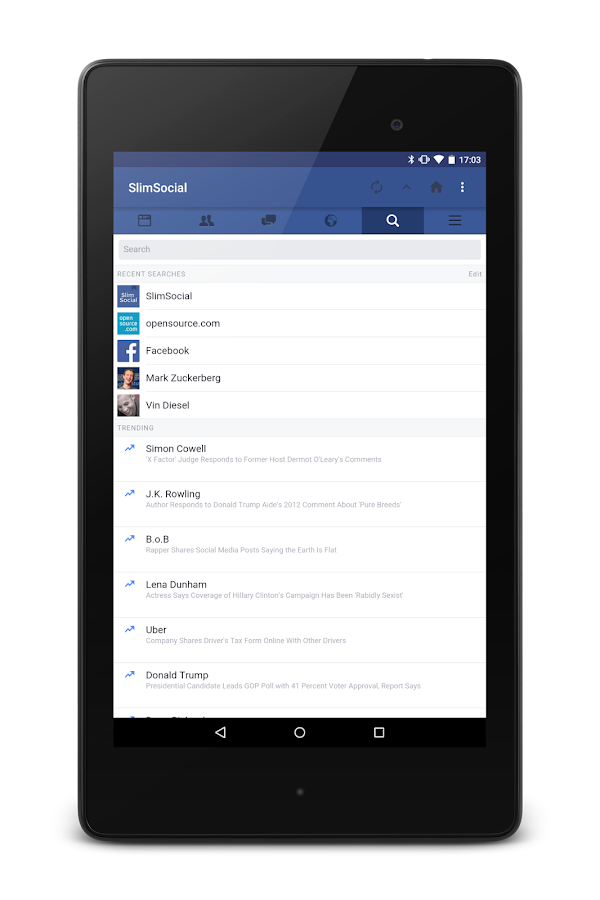
A brief search resulted in my discovering Slim Social.
It is a simple Facebook wrapper. It is quick, lite and you can access Facebook messages from within the app without having to install Facebook Messanger (although this is not what I do, more on that in another post).
Occasionally it breaks (when Facebook changes something to try and force you back to their apps) however the developer tends to get that sorted in a day or three and you are back in business.
Been using it for close to a year now and find it does all I need and is kind to my battery.
Have at it you good things.
Speaking of the real job, I need to use Facebook for work. I am not a big fan of Facebook and often wonder what my life would be like without it? More on that front later.
I have mentioned before that Facebook apps are not the best of Android friends, namely for power conservation reasons. I find that both the Facebook app and Messanger tend to be real battery hogs. So what to do?
A brief search resulted in my discovering Slim Social.
It is a simple Facebook wrapper. It is quick, lite and you can access Facebook messages from within the app without having to install Facebook Messanger (although this is not what I do, more on that in another post).
Occasionally it breaks (when Facebook changes something to try and force you back to their apps) however the developer tends to get that sorted in a day or three and you are back in business.
Been using it for close to a year now and find it does all I need and is kind to my battery.
Have at it you good things.
Tuesday, December 13, 2016
So you can save PDF's to Pocket!
I have been using Pocket (formerly "Read it Later" as my go to collecting app. If you are unfamiliar with Pocket, it acts as a vacuum cleaner, collecting all your web pages, documents and such that you want to read later is a wonderfully designed app. It is great for stripping away clutter from longer web pages you would like to read at a later date.
One of the challenges I have had is with PDF's. You can send PDF's to Pocket, however it is a little convoluted.
The caveats include:
- The PDF has to be hosted online.
- It may mangle images in the PDF.
- You need to go to this url and post the url of the PDF.
Tuesday, November 15, 2016
Google Keep versus Evernote
I'm in the process of ending my relationship with Evernote. I find it very difficult to view the changes to Evernote's model as anything other than a cynical money grab.
I used Evernote for years, most of those as a paid premium subscriber.
My main frustration with Evernote was the limit in the file structure. You had a stack then notebooks were placed in stacks. This two teired file structure was always an issue for me as there are some projects that simply require a greater degree of granuality for my use. I dealt with it and tried to make the system work for me.
The deal breaker became the decrease in Evernote's search function within the Android app. Starting about two years ago when I tried to search for notes within the Evernote Android app, regardless of what I was searching, the search would yeild zero results.
However when I conducted the same search on the Evernote website, I could find what it was that I was looking for.
During that time, I started relying on Google Keep for simple notes (like work related wifi passwords etc) and Google Drive for more complicated documents as the search function in Drive (and Keep for that matter) is far superior to my experience of Evernote on Android.
So for a few months I was in a holding pattern between the twe services. I have a couple of documents explaining how to convert my Evernote notes to several services including Google Drive and Google Keep. The precipitating incident was Evernote's price hike and series of limitations on current products.
So it is off to Drive and Keep land for me (as soon as I get a chance to work through those conversion instructions).
Interested in your experience of notes and file storage?
I used Evernote for years, most of those as a paid premium subscriber.
My main frustration with Evernote was the limit in the file structure. You had a stack then notebooks were placed in stacks. This two teired file structure was always an issue for me as there are some projects that simply require a greater degree of granuality for my use. I dealt with it and tried to make the system work for me.
The deal breaker became the decrease in Evernote's search function within the Android app. Starting about two years ago when I tried to search for notes within the Evernote Android app, regardless of what I was searching, the search would yeild zero results.
However when I conducted the same search on the Evernote website, I could find what it was that I was looking for.
During that time, I started relying on Google Keep for simple notes (like work related wifi passwords etc) and Google Drive for more complicated documents as the search function in Drive (and Keep for that matter) is far superior to my experience of Evernote on Android.
So for a few months I was in a holding pattern between the twe services. I have a couple of documents explaining how to convert my Evernote notes to several services including Google Drive and Google Keep. The precipitating incident was Evernote's price hike and series of limitations on current products.
So it is off to Drive and Keep land for me (as soon as I get a chance to work through those conversion instructions).
Interested in your experience of notes and file storage?
Monday, November 7, 2016
Android Pay live at Bendigo Bank!
I mentioned that I would notify you the moment Android Pay bevame live at Bendigo Bank in Australia as soon as it was available. How remiss of me as it has been available for about 6 weeks now. *Blush*
Um, er, so here it is! I have added all of my Bendigo Bank cards, my work based card from a smaller credit union bank, and a slew of loyalty program cards. This loyalty card program feature is quite nice (or intrusive depending on your perspective) in that the app will notify me when I am in range of an establishment that I have a registered loyalty program card for. Handy feature, especially if one of them is for building and harware store (Mitre 10, I'm looking at you!).
So, whilst I have been leaving my wallet at home and Android Paying my way through my life (Banks, Apple fight to entrench their dominance in their customers lives) I'll just leave this here then.
Um, er, so here it is! I have added all of my Bendigo Bank cards, my work based card from a smaller credit union bank, and a slew of loyalty program cards. This loyalty card program feature is quite nice (or intrusive depending on your perspective) in that the app will notify me when I am in range of an establishment that I have a registered loyalty program card for. Handy feature, especially if one of them is for building and harware store (Mitre 10, I'm looking at you!).
So, whilst I have been leaving my wallet at home and Android Paying my way through my life (Banks, Apple fight to entrench their dominance in their customers lives) I'll just leave this here then.
Monday, October 24, 2016
Facebook Messenger eating your Android battery?
I use Facebook mainly for work. Not a huge fan of the social media platform, being an avid Twitter user myself. One of the things I dislike about Facebook on Android (apart from the crass way it dominates many aspects of your device) is the terrible wear on your battery. I find battery longevity is around 20% greater when I have Facebook Messenger installed on my Nexus 5X or Pixel. What to do?
I use Slim Social as the primary way in which I interact with Facebook on my Android devices (more on that next week) however for messaging, I discovered Disa. It is a reasonably simple app that surprise surprise, does messaging! You can use it for texting, WhatsApp and Facebook however I simply use it for Facebook at this stage.
It has a slightly clunky feel to it, however in terms of functionality, it does everything that Facebook Messenger does sans the drain on your battery. You do get the option to have it poll regularly but this comes with a battery drain warning which I appreciate.
It does the trick, doesn't impact upon my battery as much as regular Messenger and sits quietly in the background. Simple. Done.
Tuesday, October 18, 2016
Tiny Scanner, a simple gem.
Simplicity itself. All I needed was an app that would a) allow me to take a photo of a document or use a preexisting image and b) create a pdf of the image and then c) allow me to append new photo's/images to the document. Icing on the cake would be the ability to alter the order of the pages in the pdf.
App after app all failing in one of the three aforementioned categories and then BOOM, Tiny Scanner.
The app has a small memory footprint, is (as far as I can tell) add/bug free and simplicity itself to use. If you need a way to quickly make your own pdf's out of your own images, with an append and/or page rearrange function, this is your baby.
I may even pay for it!
App after app all failing in one of the three aforementioned categories and then BOOM, Tiny Scanner.
The app has a small memory footprint, is (as far as I can tell) add/bug free and simplicity itself to use. If you need a way to quickly make your own pdf's out of your own images, with an append and/or page rearrange function, this is your baby.
I may even pay for it!
Subscribe to:
Posts (Atom)
-
I have been using Pocket (formerly "Read it Later" as my go to collecting app. If you are unfamiliar with Pocket, it acts as ...
-
When it comes to GTD, after a year and a half of finding the ultimate solution on Android/Windows, I have settled for Nirvana HQ . Nirv...
-
So, probably the first app I ever tried to manage tasks on Android was GTasks by Dato. It synched with Google Tasks and worked a treat. Pr...