Simplicity itself. All I needed was an app that would a) allow me to take a photo of a document or use a preexisting image and b) create a pdf of the image and then c) allow me to append new photo's/images to the document. Icing on the cake would be the ability to alter the order of the pages in the pdf.
App after app all failing in one of the three aforementioned categories and then BOOM, Tiny Scanner.
The app has a small memory footprint, is (as far as I can tell) add/bug free and simplicity itself to use. If you need a way to quickly make your own pdf's out of your own images, with an append and/or page rearrange function, this is your baby.
I may even pay for it!
Trying to get stuff done on my Pixel 2 and Chrome OS Pixelbook! Productivity tips, GTD apps and other stuff!
Tuesday, October 18, 2016
Tuesday, August 30, 2016
Pixel C Spilt Screen has arrived!
Guess what you are looking at? That's right! It is my SPLIT SCREEN Pixel C. I was on the train this morning and I was notified that my Pixel C's official Android 7.0 update was available. I accidentally hit ok and the download chewed through the last of my mobile data allowance for the month (roll on September 4!) and within 10 minutes, the Pixel had downloaded and installed the update, rebooted and then ran through the app udate process. I worked for the last 10 minutes of my morning train commute with Android 7.
I may be too much of a fanboy or 7.0 is smoother than 6.1. It seemed to transition between things more smoothly and the OS animations also seem smoother and snapier.
In the last 30 minutes, I have only played around with split screen, notifications (great improvement there) and editing the pull down settings bar (finally!). All in all, 7.0 had been a positive experience on my primary device. I'll keep you posted.
Tuesday, August 9, 2016
Handy Google Maps Article
Thursday, July 28, 2016
Android Pay is here!
Android Pay has hit Australia's shores. You need to head into the Google Play store and "Enable" it (as oppossed to the usual "Install" button. My personal frustration is that it works with my buniness related bank, but not the bank I use personally, which is the Bendigo Bank.
A frustrating conversation with the Bendigo Bank helpdesk resulted in my finding out that it is "coming" but they could not give me any kind of source I could keep my eye on when it went live.
As soon as that happens, goodbye wallet!
Sunday, April 10, 2016
BubbleUPnP, my multimedia glue app.
These days I have all of my media needs sorted by two apps. Netflix and Google Play Movies & TV. However, occasionally there is a media need that falls between those two cracks.
I have a bunch of media that sits on a Synology drive at home and to access that media, I use BubbleUPnP. I have used this app since its very beginnings. It wasn't pretty early on, however over the years, it has matured to be an incredibly stable and "automagic" app that picks up the available drives on your network, and seamlessly presents them to you with the simplicity and efficiency of a Netflix and/or Google Movies & TV app.
Just want to make sure that you are aware that you need a media player in addition to the app, as its role is to locate and serve media, which it does brilliantly.
I have a bunch of media that sits on a Synology drive at home and to access that media, I use BubbleUPnP. I have used this app since its very beginnings. It wasn't pretty early on, however over the years, it has matured to be an incredibly stable and "automagic" app that picks up the available drives on your network, and seamlessly presents them to you with the simplicity and efficiency of a Netflix and/or Google Movies & TV app.
Just want to make sure that you are aware that you need a media player in addition to the app, as its role is to locate and serve media, which it does brilliantly.
Friday, February 19, 2016
Google Now
When I think about what I will blog about here, I grab my phone or tablet and spend a few seconds thinking about the apps that I use on a regular basis that help me be productive.
Today, not only did I think about Google Now, but I also thought about how it is such a seemless part of my daily prooductivity routine that I almost did not realise that this was the case.
There is something about using an app like that, one that becomes so seamless, so much a part of the way in which you work and play that you don't realise that it has become part of your subconcious routines.
Weather, package tracking and delivery, travel, timetabling, right down to suggesting stories it grabs from the web based upon my search and reading habits, Google Now is very much a part of the way I work.
I was most delighted with a recent update to the app. I recently had an organisation book travel for me as part of my work, and Google Now took the flight information from the confirmation emails, added it to my Google calendar, and gave me timely reminders without my having to lift a digital finger.
If you are not using Google Now, give it a shot. It can feel a little intrusive, and sometimes I still get a pang along those lines, however dip into it and turn it on (you need to opt in to Google Now) and give it a whirl for a few months. See what you reckon.
Today, not only did I think about Google Now, but I also thought about how it is such a seemless part of my daily prooductivity routine that I almost did not realise that this was the case.
There is something about using an app like that, one that becomes so seamless, so much a part of the way in which you work and play that you don't realise that it has become part of your subconcious routines.
Weather, package tracking and delivery, travel, timetabling, right down to suggesting stories it grabs from the web based upon my search and reading habits, Google Now is very much a part of the way I work.
I was most delighted with a recent update to the app. I recently had an organisation book travel for me as part of my work, and Google Now took the flight information from the confirmation emails, added it to my Google calendar, and gave me timely reminders without my having to lift a digital finger.
If you are not using Google Now, give it a shot. It can feel a little intrusive, and sometimes I still get a pang along those lines, however dip into it and turn it on (you need to opt in to Google Now) and give it a whirl for a few months. See what you reckon.
Tuesday, February 9, 2016
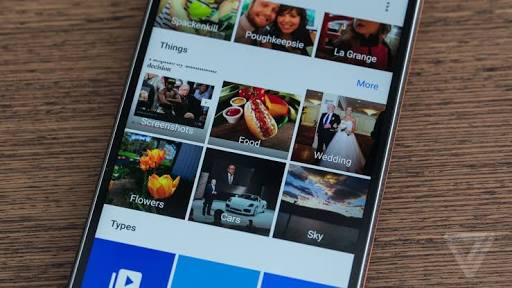
Google Photo's is amazing!
I am not sure when it happened, but suddenly Google Photo's became amazing. If you are not aware, you can choose between two modes of file storage. You can choose to store your photo's at the same quality that you took them, OR if you choose the standard photo storage size, you get unlimited (yep you read that right) storage of your photo's in Google Drive. Forever. That's it. No catch. That is the hook that first got me started.
However, the app on Android and then the web site just seemed to make a rapid number of incremental changes until it is now one of the apps that I use frequently, and it is a joy.
I think that unless you are in the media industry and have a need for particularly large files sizes for your photo's, the standard setting (which is called "high quality") is really all the average photographer needs.
What is great about Google Photo's is, like most of Google's apps these days, it is available on iOS. I have helped two of my Apple totting friends with stuttering iPhone's take advantage of the feature that removes photo's from your iPhone once they have safely been backed up to Google Drive. The free space, improved performance, ease of use and the way that we can now collaborate on projects together seamlessley across the ecosystem divide have made them rubberneck by Nexus 5 at least one time a peice.
Get on it. Google Photo's is great.
However, the app on Android and then the web site just seemed to make a rapid number of incremental changes until it is now one of the apps that I use frequently, and it is a joy.
I think that unless you are in the media industry and have a need for particularly large files sizes for your photo's, the standard setting (which is called "high quality") is really all the average photographer needs.
What is great about Google Photo's is, like most of Google's apps these days, it is available on iOS. I have helped two of my Apple totting friends with stuttering iPhone's take advantage of the feature that removes photo's from your iPhone once they have safely been backed up to Google Drive. The free space, improved performance, ease of use and the way that we can now collaborate on projects together seamlessley across the ecosystem divide have made them rubberneck by Nexus 5 at least one time a peice.
Get on it. Google Photo's is great.
Subscribe to:
Posts (Atom)
-
I have been using Pocket (formerly "Read it Later" as my go to collecting app. If you are unfamiliar with Pocket, it acts as ...
-
When it comes to GTD, after a year and a half of finding the ultimate solution on Android/Windows, I have settled for Nirvana HQ . Nirv...
-
So, probably the first app I ever tried to manage tasks on Android was GTasks by Dato. It synched with Google Tasks and worked a treat. Pr...